
Table of Contents
- A Simulator Is Really a Tracking System Plus a Visual System
- What Happens When You Hit a Shot?
- The Main Parts of a Golf Simulator
- How the Launch Monitor Captures Shot Data
- Camera, Radar, Infrared and Optical Tracking Explained
- How Software Turns Data Into Ball Flight
- Why the Impact Screen and Projector Matter
- How Accurate Are Golf Simulators?
- What Can a Simulator Tell You About Your Swing?
- Portable vs Overhead Systems: Why Setup Style Changes How It Works
- Common Reasons a Golf Simulator Gives Bad Readings
- How to Choose the Right Simulator Technology
- FAQ
- Conclusion
Indoor Golf Technology Guide
How Do Golf Simulators Work? Sensors, Screens, Software & Shot Tracking Explained
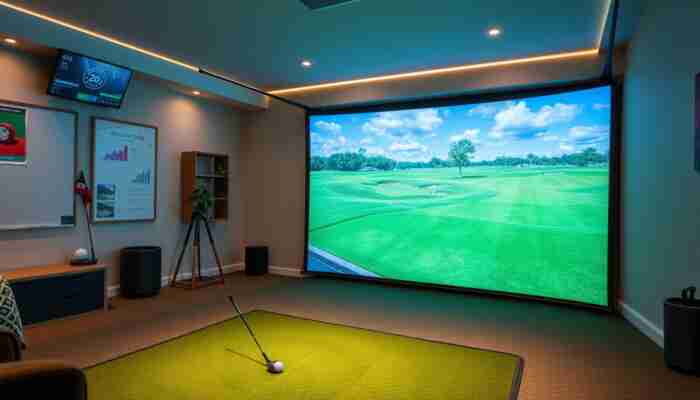
A golf simulator works by capturing what happens during your swing and at impact, then converting that data into a simulated ball flight on a virtual course. The system does not simply “guess” where the ball goes. It uses tracking hardware, software calculations, display equipment, and calibration settings to create the shot you see on screen.
The exact technology varies by system. Some golf simulators rely on cameras. Some use radar. Some use infrared or optical tracking. Many modern setups combine hardware, software, an impact screen, a projector, a hitting mat, and a launch monitor to create a complete indoor golf experience.
If you are still comparing systems, start with
golf simulators,
launch monitors,
portable launch monitors,
and
overhead launch monitors.
Quick answer
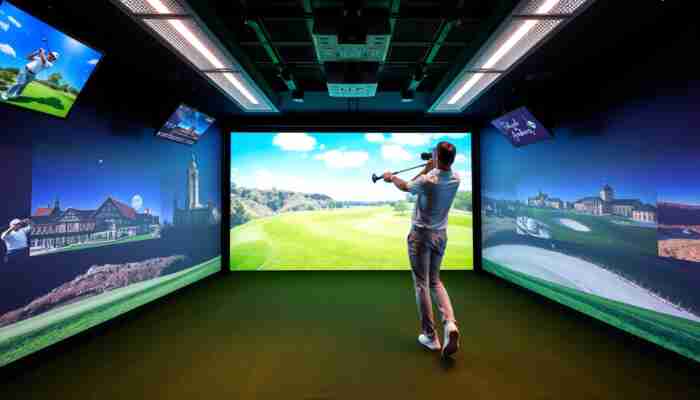
Golf simulators work by measuring the golf ball, the club, or both. A launch monitor captures data such as ball speed, launch angle, spin, club path, face angle, and carry distance. Simulator software then uses that data to calculate ball flight and display the shot on a virtual driving range or golf course.
Core concept
A Simulator Is Really a Tracking System Plus a Visual System
The tracking system measures the shot. The visual system shows the shot. The software connects both pieces. That simple structure explains almost every part of an indoor golf simulator setup.
What Happens When You Hit a Shot?
A golf simulator begins working the moment you swing through impact. The tracking device captures information about the ball, the club, or both. That information is sent to simulator software, which calculates the shot and displays the result.
In a typical indoor simulator session, the process looks like this:
The Main Parts of a Golf Simulator
A golf simulator is not one single device. It is a connected setup made from several components. Some setups are simple and portable. Others are full indoor rooms with screens, projectors, enclosures, and permanent tracking systems.
| Component | What it does | Why it matters |
|---|---|---|
| Launch monitor | Measures ball and/or club data | Determines the quality of shot tracking |
| Simulator software | Turns data into virtual ball flight | Creates the course, range, graphics, and feedback |
| Impact screen | Stops the ball and displays the image | Affects safety, image quality, noise, and bounce-back |
| Projector or display | Shows the virtual course or range | Affects immersion and visual clarity |
| Mat and hitting area | Gives you a stable place to swing | Affects comfort, strike feel, and repeatable practice |
For deeper buying paths, compare
simulator screens,
golf simulator projectors,
golf mats,
and
simulator enclosures.
How the Launch Monitor Captures Shot Data
The launch monitor is the measurement engine of the simulator. It captures the data that tells the software what happened to the shot. Without accurate tracking, the graphics may look impressive, but the practice feedback will not be as useful.
Different systems measure different data points. Common metrics include:
Ball data
- ball speed
- launch angle
- spin rate
- side spin or spin axis
- carry distance
Club data
- club speed
- club path
- face angle
- angle of attack
- impact location, depending on system

Camera, Radar, Infrared and Optical Tracking Explained
Golf simulators do not all track shots the same way. The tracking method affects setup requirements, indoor performance, portability, and the kind of feedback the golfer receives.
Camera-based tracking
Camera-based systems use high-speed images to capture the ball, club, or impact area. These systems can be strong indoors because they do not always need a long ball flight window behind or in front of the hitting zone.
Radar-based tracking
Radar-based systems track motion through radar signals. Many radar units are popular because they can be portable and useful in multiple practice environments. Indoors, radar systems may require enough room to read the ball properly, depending on the device.
Infrared and optical tracking
Infrared and optical tracking systems use light-based detection to help identify club movement, ball movement, or position data. These systems are often part of more complete simulator setups where the environment is designed around consistent tracking.
Important distinction
The tracking method is not automatically “better” or “worse” by itself. A system should be judged by how well it fits your room, your use case, the data you need, and the type of indoor golf setup you are building.
How Software Turns Data Into Ball Flight
Simulator software receives the measured shot data and turns it into a visual result. It uses the available ball and club information to estimate how the ball should launch, curve, carry, land, and roll on the virtual course.
Good software does more than show a pretty course. It helps connect the measured shot to feedback the golfer can use. That feedback may include shot shape, club delivery, carry distance, dispersion, consistency, and practice history.
This is why two simulator setups can feel very different even if both use quality hardware. The launch monitor captures the data, but the software determines how that data becomes practice feedback and gameplay.
Why the Impact Screen and Projector Matter
The impact screen and projector do not usually measure the shot, but they shape the simulator experience. A poor screen can create bounce-back, excess noise, or a dull image. A poor projector setup can make the course harder to see and reduce immersion.
In a complete home simulator, the visual system should match the room. A short room may need different projector planning than a deeper garage setup. A multi-use room may benefit from a retractable screen. A dedicated bay may work better with a permanent enclosure.
For related setup decisions, see
golf simulator impact screens,
golf simulator projector setup,
and
retractable simulator screens.
How Accurate Are Golf Simulators?
A golf simulator is only as useful as the data it captures and the setup conditions around it. Accuracy depends on the tracking device, calibration, ball position, lighting, room dimensions, software settings, and whether the system has enough space to read the shot correctly.
It is better to think of simulator accuracy as a chain. The launch monitor captures the data. The software interprets the data. The room setup helps or hurts the measurement. If one part of the chain is weak, the final result may feel less reliable.
For a deeper breakdown, read
how accurate indoor golf simulators are.
What Can a Simulator Tell You About Your Swing?
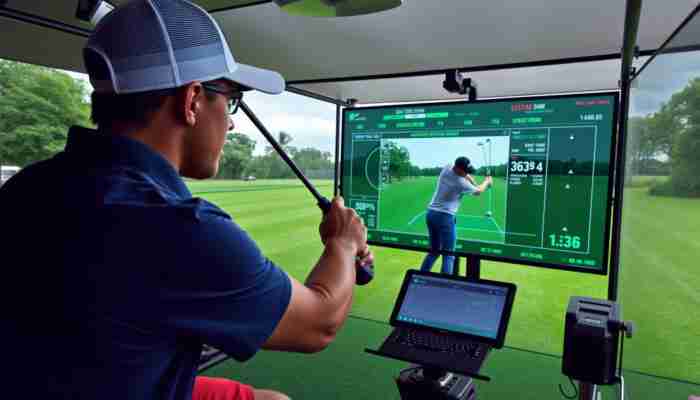
A golf simulator can help you understand patterns in your swing and ball flight. Instead of judging a shot only by feel, you can review measurable feedback after each swing.
Useful simulator feedback may include:
- whether your ball starts left, right, or on target
- whether your shot curves consistently in one direction
- whether your distance gaps are predictable
- whether your club path and face angle are changing
- whether your practice sessions are becoming more consistent
For more practice-focused advice, see
golf simulator swing analysis
and
year-round simulator practice.
Portable vs Overhead Systems: Why Setup Style Changes How It Works
A portable launch monitor and an overhead launch monitor can both power an indoor simulator, but they create different setup experiences.
| System type | How it usually works | Best fit |
|---|---|---|
| Portable launch monitor | Placed near the hitting area and moved as needed | Flexible home practice, garages, shared spaces |
| Overhead launch monitor | Mounted above the hitting zone | Dedicated simulator rooms and permanent bays |
Compare both paths here:
portable launch monitors
and
overhead launch monitors.
Common Reasons a Golf Simulator Gives Bad Readings
When a simulator result seems wrong, the cause is not always the software. Many bad readings come from setup issues, room conditions, calibration, or incorrect placement.
How to Choose the Right Simulator Technology
The right simulator technology depends on what you want the system to do. A beginner may need simple feedback and easy setup. A serious player may need detailed club and ball data. A commercial facility may need durability, support, and repeatable performance across many users.
If you want a complete indoor setup
Browse golf simulators and compare full system paths.
If tracking quality matters most
Start with launch monitors.
If you have limited space
Read the small-space simulator guide.
If you are buying your first simulator
Use the beginner simulator buying guide.
FAQ
How do golf simulators work?
Golf simulators work by using a launch monitor or tracking system to measure the shot, then using software to calculate ball flight and display the result on a screen, projector, monitor, or tablet.
Do golf simulators track the ball or the club?
Some systems track mostly the ball, some track the club, and some track both. The measured data depends on the launch monitor and tracking technology used in the simulator.
What technology do golf simulators use?
Golf simulators may use camera tracking, radar tracking, infrared sensors, optical sensors, simulator software, impact screens, projectors, and launch monitors. The exact combination depends on the system.
Are golf simulators accurate?
Golf simulator accuracy depends on the quality of the tracking system, calibration, room setup, lighting, ball position, and software interpretation. A well-matched setup can provide useful and repeatable feedback.
Do you need a projector for a golf simulator?
No. A projector is not always required. Some setups use a tablet, computer monitor, or TV. A projector and impact screen create a more immersive simulator room, but simpler practice setups can work without one.
What is the most important part of a golf simulator?
The launch monitor is usually the most important performance component because it captures the shot data. The screen, projector, mat, enclosure, and software then shape the overall experience.
Conclusion
Golf simulators work by combining measurement and simulation. The tracking system measures the shot, the software calculates the result, and the display system shows the ball flight on a virtual range or course.
The best simulator setup is the one where all parts work together: launch monitor, software, screen, projector, mat, room layout, and calibration. Once you understand how each piece works, it becomes much easier to choose the right indoor golf system for your home, practice goals, or commercial setup.

Emma Sinclair is a passionate author and expert on indoor golf simulators, dedicated to bringing golf enthusiasts and beginners alike the latest insights and trends in this evolving field. With a background in sports technology and a love for the game, she explores how indoor simulators can enhance practice, improve skills, and create immersive experiences for players of all levels. Emma’s writing aims to bridge the gap between traditional golf and modern technology, making the game more accessible and enjoyable for everyone.


Discussion
8 Responses
I love how you’ve broken down the inner workings of golf simulators! It’s fascinating how technology has transformed the way we experience golf indoors. A few years ago, my idea of an indoor golf experience was swinging a club in my living room and hoping to not break anything valuable—like my grandmother’s porcelain figurines!
I totally relate to that! Remembering the days when the best indoor golf option was dodging furniture with every swing brings a smile. It’s cool to see how far we’ve come with golf simulators—it’s like magic compared to those “don’t break grandma’s stuff” days.
“I’m glad you enjoyed the article! If you’re interested in exploring more about indoor golf experiences and how they’ve evolved, check out this amazing resource that dives deeper into the latest technologies.”
https://golfsimplanet.com/FlightScopeMevoProPackageFaceImpactLocationBundle
It’s fascinating to see how golf simulators have evolved, especially considering the engineering and technology that goes into creating an authentic experience. As someone who has dabbled in indoor golf for a few years now, I find it intriguing to compare the different systems available. The thought of a simulator using various technologies, from infrared to radar, raises questions about how each method influences the accuracy and feel of the simulation.
This guide really sheds light on the fascinating world of golf simulators! I’ve always been intrigued about how these systems can so accurately replicate the experience of playing on a real course. The technology behind them is truly impressive, especially as it continues to evolve.
I found your breakdown of how golf simulators work both insightful and illuminating. As someone who has dabbled in both traditional golf and indoor golf experiences, I can appreciate the impressive technical advancements that have transformed the way we engage with the game. It’s fascinating to think about how these systems—despite their varied technology, like radar and camera tracking—ultimately create an environment that mimics the real-world challenges of the sport.
This is such a fascinating deep dive into how golf simulators work! I recently tried out a radar-based system at my local golf club, and I was amazed by how accurately it reflected my swing and ball flight. It really felt like I was out on the course, even though I was indoors.
This is such an intriguing overview of how golf simulators work! I recently had the chance to try one out and was amazed at how accurately it captured my swing data. It’s fascinating to think about the blend of technology involved, especially how different systems utilize various methods like radar and cameras.
It’s fascinating to delve into the intricacies of golf simulators, especially given how they blend cutting-edge technology with the timeless game of golf. The way these systems analyze swing biomechanics and ball trajectory before translating that data into virtual play is a significant leap forward for golfers looking to refine their skills without stepping onto the course.