- Home
- TruGolf Simulators
TruGolf Simulators
A TruGolf simulator — also called a TruGolf golf simulator package, TruGolf home golf simulator, or TruGolf indoor golf system — is a complete simulator or practice build centered on one of TruGolf’s two main launch-monitor paths: the APOGEE, a ceiling-mounted overhead launch monitor, or the LaunchBox, a compact portable camera-based launch monitor. On GolfSimPlanet, the TruGolf cluster should be understood as a brand family rather than a single product: APOGEE DIY and enclosure-based simulator packages for dedicated indoor rooms, Starter 10 and MAX turnkey simulator systems, and LaunchBox DIY and Practice packages for golfers who want a more flexible or lower-footprint setup. TruGolf’s official APOGEE materials confirm that the overhead system measures club and ball data without marked clubs or specialty balls, provides slow-motion impact replay, supports seamless right- and left-handed play, and includes user-experience features such as voice commands and the Laser Launchpad. Indoor Golf Outlet’s TruGolf collection confirms the broader package structure across APOGEE, LaunchBox, Starter 10, and MAX. If you want a fixed overhead simulator path, start with TruGolf APOGEE and compare it to our overhead launch monitors. If you want the broader brand-level view first, this page should bridge you into TruGolf launch monitors, simulator software, and the main golf simulators category before choosing the right package type.
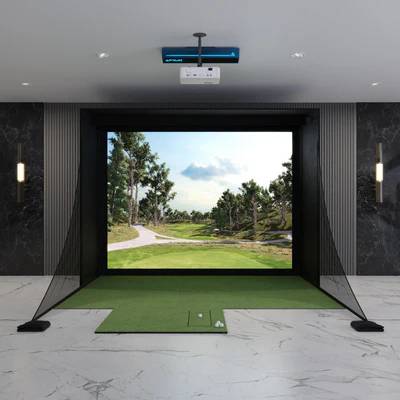
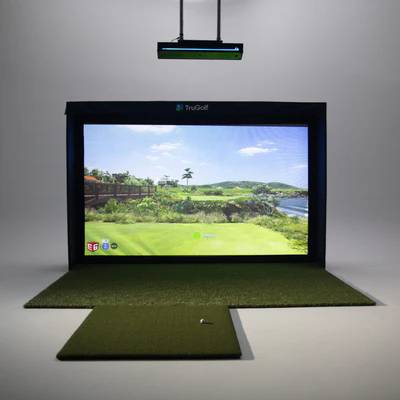
TruGolf Simulator Lines — What Each Path Is Built Around
TruGolf simulator packages do not all serve the same buyer intent. The current TruGolf ecosystem breaks into three practical paths: overhead APOGEE systems for fixed simulator rooms, portable LaunchBox systems for smaller or more flexible builds, and turnkey TruGolf systems such as Starter 10 and MAX for buyers who want a more all-in-one simulator direction.
APOGEE Simulator Path
APOGEE is TruGolf’s overhead launch monitor path. Indoor Golf Outlet currently lists APOGEE DIY, APOGEE SIG, APOGEE Pro, Starter 10, and MAX-based systems around that ecosystem. APOGEE is the correct direction when you want a ceiling-mounted setup, a clear hitting area, no marked balls or club stickers, and a more permanent indoor simulator room. See the dedicated TruGolf APOGEE DIY package and TruGolf APOGEE launch monitor pages.
LaunchBox Simulator Path
LaunchBox is TruGolf’s compact portable path. Indoor Golf Outlet currently lists LaunchBox SIG, LaunchBox DIY, and LaunchBox Practice packages. The LaunchBox route is the better fit when you want dual-camera ball data, PC/iOS compatibility, and a lower-footprint simulator or practice build that can start with a net package and scale upward into a full enclosure.
Starter 10 & MAX Turnkey Systems
The Starter 10 and MAX are TruGolf’s more turnkey simulator directions. Starter 10 is designed for easier setup and takedown and can be purchased in a standard golf-only version or with MultiSport ARCADE. MAX is a larger fixed simulator package built around APOGEE, enclosure components, projector, flooring, and E6 software. See the dedicated TruGolf MAX Golf Simulator page.
TruGolf Simulator Technology — APOGEE vs. LaunchBox
| Primary TruGolf launch monitor paths | APOGEE overhead launch monitor and LaunchBox portable launch monitor |
| APOGEE mounting style | Ceiling-mounted overhead launch monitor |
| APOGEE measured data confirmed in retailer specs | Ball Speed, Back Spin, Side Spin, Vertical Launch Angle, Horizontal Launch Direction, Club Head Speed, Club Face Angle, Club Path |
| APOGEE ease-of-use features | No marked clubs or specialty balls, Laser Launchpad, voice commands, APOGEE Intelligent Dashboard, slow-motion impact replay |
| LaunchBox technology | Portable dual high-speed camera launch monitor |
| LaunchBox onboard display measures | Carry Distance, Ball Speed, Back Spin, Side Spin, Vertical Launch Angle, Horizontal Launch Direction |
| LaunchBox in-game measures | Total Distance, Club Head Speed, Smash Factor, Deviation, Apex, Descent Angle, Shot Type |
| LaunchBox dimensions / weight | 9.53" H × 7" W × 5" D; 2.7 lbs |
| Software direction | APOGEE is tied into TruGolf’s E6 software ecosystem; current official pages show E6 CONNECT: Home for APOGEE and current E6 APEX subscription paths with practice and course-play tiers |
| Who should start with each | Choose APOGEE for a fixed overhead room; choose LaunchBox for a smaller, more flexible, or lower-cost package path |
Which TruGolf Simulator Type Fits Your Room and Goals?
Choose APOGEE If You Want Overhead Simplicity
APOGEE is the strongest TruGolf direction when you want the launch monitor mounted overhead rather than sitting beside or behind the ball. That creates a cleaner hitting area, easier right/left-handed switching, and a more premium fixed-room layout. Compare it directly against our overhead launch monitors category.
Choose LaunchBox If You Want a Smaller Entry Point
LaunchBox is the better TruGolf path if you want to begin with a smaller package, a practice net, or a more budget-conscious DIY enclosure build. Indoor Golf Outlet’s LaunchBox line shows a clear ladder from Practice Package to DIY and SIG simulator packages.
Choose Starter 10 If You Want Easy Setup/Takedown
Starter 10 is the correct TruGolf simulator path when the buyer intent is portability of the enclosure system itself, not just the launch monitor. Indoor Golf Outlet positions Starter 10 as easy to set up and take down, with standard golf and MultiSport ARCADE variants.
Choose MAX If You Want the Most Turnkey TruGolf Room
MAX is the TruGolf path for buyers who want a larger turnkey simulator package with APOGEE, enclosure, flooring, projector, and E6 software already wrapped into one product direction. Indoor Golf Outlet recommends roughly 15' W × 20' D × 10' H for that package.
TruGolf Simulators FAQ
What are the main TruGolf simulator types?
The current TruGolf ecosystem splits into two main hardware directions — APOGEE and LaunchBox — plus packaged systems such as Starter 10 and MAX. APOGEE is the overhead route, LaunchBox is the smaller portable route, Starter 10 is an easier setup/takedown simulator system, and MAX is the more turnkey fixed-room direction.
Does TruGolf APOGEE need marked balls or club stickers?
No. TruGolf’s official APOGEE page and Indoor Golf Outlet’s APOGEE package pages both state that APOGEE measures club and ball data without marked clubs or specialty balls. That is one of the clearest usability advantages of the APOGEE simulator path.
What software do TruGolf simulators use?
TruGolf simulator packages are built around the E6 ecosystem. Official TruGolf pages currently show E6 CONNECT: Home as an owned software product for APOGEE and E6 APEX subscription paths with practice features and course-play availability through higher subscription levels. Explore our software page if software choice is part of the buying decision.
Which TruGolf simulator is best for home buyers?
That depends on intent, not just budget. APOGEE is better for a dedicated overhead simulator room, LaunchBox is better for a smaller or more flexible build, Starter 10 is better if easy setup and takedown matter, and MAX is better if you want a larger turnkey room package.
Related Categories
Key Features of Our TruGolf Simulators
TruGolf Simulators — Key Specs & Selection Criteria
Four attributes make TruGolf the right simulator brand for a specific buyer: a true overhead APOGEE path, a smaller LaunchBox path, turnkey simulator options like Starter 10 and MAX, and a tightly integrated E6 software ecosystem for practice and course play.
APOGEE Overhead Experience
APOGEE is TruGolf’s strongest differentiator for serious indoor rooms. It is ceiling-mounted, keeps the floor clear, works without marked balls or specialty clubs, and adds user-experience features such as Laser Launchpad guidance, voice commands, and slow-motion impact replay.
LaunchBox Entry Point
LaunchBox gives TruGolf a much more flexible lower-footprint path. It uses dual high-speed cameras, works with PC and iOS, and can sit inside a practice package, DIY enclosure package, or SIG package depending on how complete the room build needs to be.
Turnkey Systems for Different Intent
TruGolf does not force every buyer into the same room build. Starter 10 targets easier setup and takedown, while MAX is a larger fixed-room package that combines APOGEE, enclosure, flooring, projector, and E6 software into a more complete simulator direction.
E6 Software Ecosystem
TruGolf’s simulator value is not just hardware. The brand’s commercial strength also comes from the E6 software stack, with owned and subscription-based paths depending on product line and use case. That matters because simulator buyers often choose software ecosystem before they finalize enclosure and projector decisions.
📋 TruGolf is not one single simulator type. Start by deciding whether you want overhead APOGEE, portable LaunchBox, easy-setup Starter 10, or turnkey MAX — then move to the matching product page and supporting category links.
Why Choose Us When You Shop TruGolf?
Why Buy a TruGolf Simulator from GolfSimPlanet?
TruGolf is one of the brands where shoppers can easily pick the wrong package if the page structure is too generic. The real decision is not just “Do I want TruGolf?” but “Do I want APOGEE overhead, LaunchBox portability, Starter 10 easy setup, or MAX turnkey scale?” GolfSimPlanet can make this page more useful by reinforcing the correct next-step pages inside the TruGolf cluster — TruGolf launch monitors, APOGEE launch monitor, APOGEE DIY package, TruGolf MAX, software, and golf simulator computers. That makes the category work as a real buying hub instead of a thin brand page.