Table of Contents
- What Simulator Accuracy Actually Means
- The Biggest Factors That Affect Indoor Golf Simulator Accuracy
- Are Golf Simulator Distances Accurate?
- Where Indoor Golf Simulators Are Strongest
- Where Simulators Are Less Perfect
- How to Improve Simulator Accuracy at Home
- The Biggest Accuracy Mistakes Golfers Make
- Best Next Step Based on Your Goal
- FAQ
- Conclusion
Indoor Simulator Accuracy Guide
How Accurate Are Indoor Golf Simulators? What Really Affects Results at Home
Indoor golf simulators can be impressively accurate, but they are not magically accurate in every room, with every ball, and in every setup. The real answer depends on the quality of the tracking system, the room conditions, the way the simulator is calibrated, and the kind of shot data you expect it to deliver.
That matters because most golfers are not asking whether a simulator looks good on a screen. They want to know whether the carry distances, ball flight, shot shape, spin, and practice feedback are trustworthy enough to improve their game. In a good setup, the answer is often yes. In a poor setup, the experience can feel far less reliable than people expect.
If you are still comparing the main equipment paths first, start with
golf simulators,
launch monitors,
portable launch monitors,
and
projector setup for virtual golf accuracy.
Quick answer
A well-built indoor golf simulator can be very accurate for carry distance, launch direction, shot shape, and general practice feedback. Accuracy becomes strongest when the launch monitor fits the room, the setup is calibrated correctly, the hitting area is clean, and the golfer uses consistent balls and positioning. Accuracy becomes weaker when the room is cramped, the setup is misaligned, or the simulator is expected to reproduce every real-world condition perfectly.
What Simulator Accuracy Actually Means
Accuracy in an indoor golf simulator is not one single number. It is really a combination of several things: how well the system reads ball speed, launch angle, spin, carry, direction, and sometimes club-delivery data. A simulator can be very good at some of those and less impressive at others.
For most home golfers, the real question is simpler: does the simulator give feedback that is reliable enough to practice with confidence? If the answer is yes, then the setup is already doing the most important job. Total perfection is not always required. Trustworthy feedback is.
A simulator feels accurate when…
- carry distances are believable
- shot start lines make sense
- shot shape patterns are repeatable
- practice changes show up clearly in the data
- the setup behaves consistently session to session
A simulator feels inaccurate when…
- distances jump around too much
- spin or curvature look unrealistic
- misreads happen too often
- setup conditions change the results too easily
- you stop trusting the feedback
The Biggest Factors That Affect Indoor Golf Simulator Accuracy
1. The launch monitor technology
The tracking engine is the foundation of simulator accuracy. Different systems are better suited to different environments and different types of golfers. Some are built more for portability and convenience. Others are built for deeper simulator-room use and more advanced feedback.
That is why simulator accuracy and
launch monitor accuracy and feature comparison
are closely connected. The simulator is only as trustworthy as the tracking technology behind it.
2. Room size and hitting space
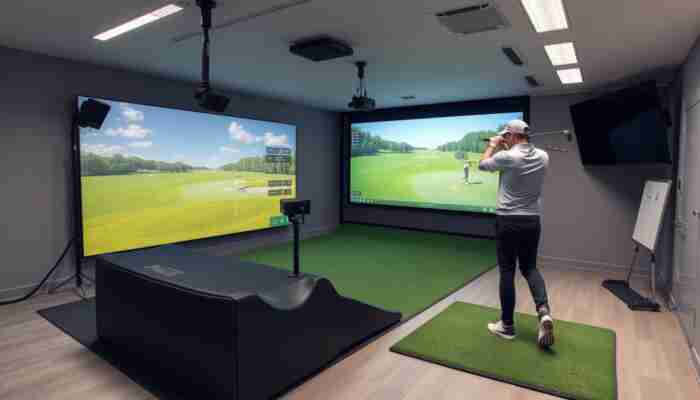
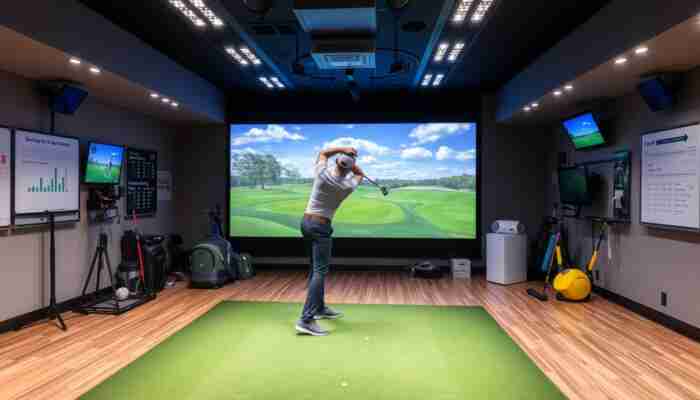
A cramped room can hurt simulator performance more than buyers expect. Limited ceiling height, poor depth, awkward swing clearance, and compromised positioning all reduce the quality of the experience. Even when the device itself is strong, the room can become the accuracy bottleneck.
3. Lighting and environment
Indoor systems are more controlled than outdoor practice, but they are still sensitive to setup quality. Lighting conditions, reflective surfaces, clutter around the hitting area, and inconsistent ball placement can all reduce accuracy.
4. Calibration and alignment
A simulator that is not properly aligned can feel far less reliable than it should. Good calibration helps the system interpret shots the way it was designed to. Bad calibration creates doubt, and once doubt sets in, the simulator becomes less useful as a practice tool.
5. Golf balls and hitting consistency
Worn balls, inconsistent ball placement, or poor strike conditions can distort what you think the simulator is doing. In many home setups, inconsistent inputs are mistaken for simulator inaccuracy.
6. Software and visual setup
The simulator’s software and projected image do not change the raw strike itself, but they strongly affect perceived accuracy. If the image feels stretched, dim, delayed, or unnatural, the whole experience feels less trustworthy. That is why screen and projector logic still matter for the total result.
| Accuracy factor | Why it matters | What usually goes wrong |
|---|---|---|
| Launch monitor quality | Drives core shot-reading reliability | Wrong device for the environment |
| Room size | Supports clean swing and setup geometry | Compromised positioning and awkward swings |
| Lighting and environment | Improves sensor reading stability | Misreads or weaker detection |
| Calibration | Keeps readings repeatable | Distances and directions feel off |
| Golf balls and strike quality | Improves input consistency | Bad inputs blamed on the simulator |
| Software and visuals | Supports trust and realism | The simulator feels less believable than it should |
Are Golf Simulator Distances Accurate?
Distance is usually the first thing golfers question, and for good reason. If the carry numbers look wrong, the whole simulator starts to feel unreliable. In a strong setup, simulator distances can be very useful for gapping, practice, and seeing relative changes in strike quality.
But distance accuracy is not purely about the number on the screen. It depends on whether the launch, spin, strike, and ball-speed inputs are being read correctly. That is why distance complaints are often really launch-monitor or setup complaints in disguise.
Good way to think about it
A simulator does not need to reproduce every real-world shot perfectly to be useful. It needs to be consistent enough that your distances, shot tendencies, and practice feedback make sense over time.
Where Indoor Golf Simulators Are Strongest
Practice consistency
Indoor simulators are often strongest when used for repeatable practice. That includes seeing patterns in contact, carry gaps, directional tendencies, and shot shape changes over time.
Ball flight trends
A good simulator is usually very helpful for understanding whether a shot launched higher or lower, started farther left or right, or curved more than expected.
Year-round skill work
One of the biggest strengths of simulators is that they make year-round golf possible at home. That is why they work especially well for
year-round skill improvement
and structured indoor practice.
Where Simulators Are Less Perfect
Turf interaction and lie realism
Even strong simulators cannot fully reproduce every turf condition, uneven lie, weather factor, or outdoor course variable. That does not make them inaccurate. It just means simulator golf is still its own environment.
Poorly optimized home setups
Many complaints about simulator inaccuracy come from suboptimal home conditions, not from the simulator category itself. That is why room design, projector alignment, and total setup logic matter more than many buyers expect.
Expecting total one-to-one outdoor replication
Simulators are best understood as powerful practice and play environments, not perfect copies of every outdoor condition. That distinction helps set realistic expectations and improves satisfaction with the system.
How to Improve Simulator Accuracy at Home
A smarter accuracy checklist
- Match the launch monitor to the room and use case
- Leave enough space for a natural swing
- Keep the hitting area clean and consistent
- Use proper alignment and regular calibration
- Use decent balls and consistent placement
- Fix projector and screen issues that hurt perceived realism
If your real goal is better overall home performance, the best next step is usually to think in systems. That means the simulator, launch monitor, screen, projector, and room all need to support each other. A weaker link anywhere in that chain can make the whole setup feel less accurate.
The Biggest Accuracy Mistakes Golfers Make
Best Next Step Based on Your Goal
If you want to compare simulator directions first
Start with the main golf simulators page.
If tracking quality is the real concern
Review launch monitors next.
If you want a lighter home setup with strong value
Compare portable launch monitors first.
If you want the broader home-use perspective
Read how simulators improve practice and play at home.
FAQ
How accurate are indoor golf simulators?
Good indoor golf simulators can be very accurate for carry distance, launch direction, and shot-shape feedback. The real answer depends on the quality of the launch monitor, the room, the calibration, and the consistency of the setup.
Are golf simulator distances accurate?
They can be very useful and very believable in a strong setup. Distance accuracy is usually best when ball speed, launch, spin, and strike quality are all being read properly and the simulator is calibrated well.
Why do simulator distances sometimes feel short or long?
The most common reasons are setup issues, lighting, room constraints, worn balls, misalignment, or launch-monitor limitations relative to the space. Sometimes the golfer’s indoor swing also changes the result.
Does room size affect simulator accuracy?
Yes. Ceiling height, depth, width, and overall hitting space all affect how naturally you swing and how well the simulator can operate in its intended conditions.
Do cheap or worn golf balls hurt simulator accuracy?
They can. Inconsistent or worn balls can reduce the quality of the input the simulator is reading, which makes the results feel less trustworthy.
Are indoor golf simulators accurate enough to improve your game?
Yes, especially when the setup is stable and the data is consistent enough to show real patterns. For most golfers, that level of accuracy is more than enough to make home practice meaningfully better.
Conclusion
Indoor golf simulators can be highly accurate, but the truth is more nuanced than a simple yes-or-no answer. Accuracy comes from the whole system working together: the launch monitor, the room, the lighting, the calibration, the balls, and the overall setup quality.
The smartest way to judge a simulator is not to ask whether it is perfect. It is to ask whether it is consistent, believable, and useful enough to improve your practice and decisions. In a strong home setup, that answer is often yes.

Ethan Reynolds is a passionate writer and enthusiast in the world of indoor golf simulators. With a keen eye for technology and a deep understanding of golf dynamics, he explores the intersection of sports performance and innovative simulation tools. Through his engaging articles, Ethan provides valuable insights and tips for golfers at all levels, helping them enhance their game while enjoying the convenience of home-based training.
Discussion
12 Responses
Your exploration of indoor golf simulators raises some vital points that often get overlooked in discussions about how these devices can replicate real-life golfing experiences.
What a fascinating exploration of indoor golf simulator accuracy! It’s intriguing to think about how much the setup and environment can influence the data we get. I’ve personally experienced this firsthand. A few months ago, I set up a portable launch monitor in my living room, and while the visuals were stunning, the results felt off. I quickly realized that my lighting was subpar and the walls were creating unwanted echoes that affected the sensor’s readings.
Your insights on the complexities of indoor golf simulator accuracy really hit home for me. I’ve been a golf enthusiast for years, but I never really thought about how much the room dynamics and setup can affect my experience. It’s intriguing to consider that two setups that look similar on the surface can yield vastly different results based purely on calibration and conditions.
This is a thoughtful exploration into the nuances of indoor golf simulators. It’s intriguing how many golfers might overlook the myriad of factors that affect accuracy. In my own experience with a mid-range simulator, I’ve found that lighting and room dimensions played a significant role in the data accuracy. Initially, I set up in a room with low ceilings and fluorescent lighting, and the results were inconsistent, particularly with shot shapes and carry distances.
It’s interesting how personal experiences shape our understanding of technology like simulators. Your insights about lighting and room dimensions really highlight the importance of the setup. A lot of golfers might underestimate how much those environmental factors can skew results.
“Thanks for sharing your insights! If you’re looking to enhance your indoor golfing experience, check out this guide on optimizing your setup for better accuracy.”
https://golfsimplanet.com/FlightScopeDIYSimulator
It’s fascinating to delve into the nuances of indoor golf simulators and how their accuracy can vary so significantly based on several factors. I’ve had my fair share of experiences with different setups, and it genuinely highlights how critical proper calibration and room conditions can be.
Your points about the accuracy of indoor golf simulators raise important considerations for enthusiasts looking to improve their game at home. Calibration and room conditions genuinely play a crucial role in how well these systems perform. I’ve experienced firsthand how even minor adjustments to lighting can skew the results, particularly with certain launch monitors. For example, in my own setup, I found that adjusting the position and angle of the simulator helped significantly improve the feedback during sessions.
You’ve touched on a really crucial aspect of using indoor golf simulators—the influence of calibrations and environmental factors. It’s fascinating how something as simple as lighting can impact performance. I’ve come across situations where enthusiasts overlooked those nuances, focusing strictly on the tech specs without considering their surroundings.
Indoor golf simulators have certainly transformed the way we practice and experience the game, especially when outdoor options are limited. Your post does an excellent job of highlighting the nuances that impact the accuracy of these systems. It’s fascinating to consider how factors like room conditions and calibration can make such a significant difference in the data being produced.
This is such an interesting exploration of indoor golf simulators! I recently set one up in my garage, and it really opened my eyes to how much room conditions influence accuracy. I initially had a lot of inconsistent data, and it turned out the lighting was affecting the sensors. After some adjustments, like better lighting and placement, the results were incredible!
This guide really hits the nail on the head! I’ve spent my fair share of time setting up my home simulator, and boy, talk about a learning curve. Who knew the placement of my cat’s scratching post could impact the accuracy of my drive? I’m pretty sure he thought he was the captain of my indoor golf ship, but I was the one struggling to decipher why my ball was slicing more than a fresh loaf of bread.
It’s interesting how the setup of an indoor golf simulator can dramatically change the experience and accuracy. I’ve seen friends get frustrated when they invest in high-end equipment but skimp on the quality of their space or calibration. It’s like having a top-tier race car but not tuning it properly before hitting the track!