
- Home
- FlightScope Launch Monitors
FlightScope Launch Monitors
A FlightScope launch monitor is a radar-based golf tracking device built for golfers who want portable shot data, simulator capability, and practical game-improvement feedback without moving straight into the premium price tier of camera-based fitting systems. The FlightScope lineup currently centers on models such as the Mevo, Mevo+, Mevo Gen2, and X3 / X3C, with the strongest search demand and buying interest focused on the Mevo family and Mevo+ for home simulators and indoor-outdoor practice. According to live SERP results and official FlightScope product pages, FlightScope positions these monitors around radar-based ball tracking, portable simulator use, and performance data for golfers, coaches, instructors, and fitters. That makes this category especially relevant for buyers comparing budget-to-mid-tier simulator builds, garage practice setups, backyard range sessions, and portable launch monitor packages that can move between indoor and outdoor use.
The most commercially important FlightScope buyer journey usually starts with one of three decisions. First: Mevo vs Mevo+ — basic portable practice data versus a more simulator-ready platform. Second: Mevo+ / Mevo Gen2 vs premium launch monitors — whether a golfer wants stronger value and flexibility or more advanced fitting-grade precision. Third: portable range-use monitor vs full simulator build — whether the user is building around a hitting net and mat, or a complete room with enclosure, impact screen, and projector. That is why FlightScope is such a strong category for GolfSimPlanet: these products sit right at the intersection of portable launch monitors, home golf simulators, and software-driven practice systems.
FlightScope’s core technical identity is different from brands like SkyTrak or Foresight. FlightScope is primarily associated with 3D Doppler radar tracking, which is why its monitors are so often discussed in terms of indoor-outdoor versatility, portable range use, and simulator flexibility. The Mevo is typically the entry point for golfers who want affordable swing and ball-flight feedback. The Mevo+ is the more common simulator-focused choice because it is marketed as an indoor and outdoor launch monitor and simulator for golfers, coaches, instructors, and fitters. The newer Mevo Gen2 is positioned by FlightScope as a value-forward portable monitor with improved indoor and outdoor accuracy at its price point. At the top end, the X3 / X3C sits in the pro-level category, with the official X3C product page highlighting a combination of 3D Doppler tracking radar and synchronized image processing for higher-end data capture and fitting workflows.
From a user-intent perspective, FlightScope launch monitors attract four main audiences: golfers looking for a budget or mid-range launch monitor, simulator buyers building a portable home setup, players who want a unit that works for both indoor practice and outdoor range sessions, and more advanced users comparing Mevo+ or X3 against alternatives in our Portable Launch Monitors, SkyTrak Launch Monitor, and Golf Simulators categories. Software intent matters here too: many FlightScope buyers are not just buying a tracking device — they are buying into simulator play, practice apps, and home build compatibility, so software and room-fit considerations are part of the purchase decision, not an afterthought. That is why this page is structured to help users choose the right FlightScope model based on budget, room size, simulator goals, and practice style.
Contact our Scottsdale, AZ team if you want help choosing the right FlightScope monitor and package configuration. We can help you decide whether a simple portable practice setup is enough, whether you should step up to a Mevo+ or Mevo Gen2 simulator package, or whether your project needs a larger build with the right simulator software, room dimensions, and accessories from the start.
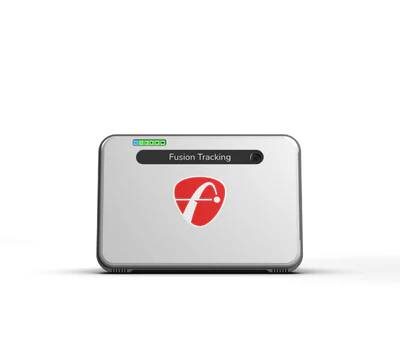
FlightScope Mevo+ Launch Monitor

FlightScope X3 Launch Monitor and Golf Simulator
FlightScope Launch Monitor Packages — What Each Setup Is Actually For
FlightScope launch monitors cover a wider price and use-case spread than many buyers realize. The Mevo is the low-cost entry point for basic portable practice, the Mevo+ is the most important simulator-focused model in the lineup, the Mevo Gen2 is the newer value-driven portable monitor positioned around improved indoor and outdoor accuracy, and the X3 / X3C sits at the professional end for coaches, fitters, and advanced simulator builds. All of them are built around FlightScope’s radar-first tracking approach, but they are not interchangeable. The right FlightScope package depends on whether your goal is range practice, a garage simulator, a backyard net setup, or a more advanced studio build with enclosure, impact screen, projector, and simulator software.
FlightScope Mevo Practice Package
Includes: FlightScope Mevo portable launch monitor + hitting mat or practice mat + hitting net or open-range use depending on your setup. Configuration: Practice-first, not full premium simulator-first. The Mevo is the lightweight entry point for golfers who want carry distance, speed-based feedback, and basic launch-monitor functionality at a lower cost than Mevo+ or pro-grade units. Use case: Range sessions, backyard practice, garage net work, and golfers who want a personal launch monitor without building a full simulator room. Space: Best suited to portable setups where ease of transport and quick setup matter more than a full projector-and-screen environment. Why choose it: The Mevo is the practical FlightScope choice when your main goal is affordable shot feedback, not an advanced simulator build.
FlightScope Mevo+ Home Simulator Package
Includes: FlightScope Mevo+ launch monitor + optional simulator enclosure + impact screen + projector + hitting mat + simulator software stack depending on package. Configuration: This is the most important FlightScope simulator setup for home users because Mevo+ is marketed by FlightScope as an indoor and outdoor launch monitor and simulator for golfers, coaches, instructors, and fitters. Use case: Home simulator builds, garage bays, basement setups, and golfers who want one unit for both indoor simulator play and outdoor range work. Space: Mevo+ is radar-based, so room depth matters more than with camera-first launch monitors; it is best for users who have enough total depth to place the unit behind the ball and still create a realistic hitting environment. Why choose it: Mevo+ is the FlightScope model most buyers should start with if simulator play matters as much as practice data.
FlightScope Mevo Gen2 Practice & Simulator Package
Includes: FlightScope Mevo Gen2 launch monitor + optional net package, mat package, or full simulator kit depending on the bundle. Configuration: The Mevo Gen2 is positioned by FlightScope around improved indoor and outdoor accuracy for the price point, which makes it especially relevant for golfers comparing older Mevo units, entry launch monitors, and simulator-ready budget builds. Use case: Golfers who want better value than the original Mevo, more serious home practice, and a launch monitor that can scale from a simple net bay into a more complete simulator package over time. Space: Best for users who need portability but still want a model that makes sense in a home net studio or retractable garage build. Why choose it: Mevo Gen2 sits in the sweet spot for buyers who want stronger modern FlightScope value without jumping to pro-level X3 pricing.
FlightScope X3 / X3C Professional Package
Includes: FlightScope X3 or X3C + premium practice or simulator package with enclosure, screen, projector, PC/software, and fitting-oriented accessories depending on the build. Configuration: According to the official FlightScope X3C product page, the X3C combines 3D Doppler tracking radar with synchronized image processing for higher-end data capture. Use case: Instructors, fitters, commercial studios, advanced players, and users who need pro-level tracking beyond the Mevo family. Space: Better suited to larger rooms or commercial environments where you can fully support radar-based tracking and premium simulator geometry. Why choose it: The X3 / X3C is the correct FlightScope category when you are no longer buying a consumer launch monitor — you are buying a professional teaching, fitting, and simulator platform.
FlightScope Launch Monitors — Technical Positioning & Practical Buying Specs
| Core technology | FlightScope is primarily built around radar-based golf tracking; official FlightScope pages describe Mevo, Mevo+, and X3 around radar-driven ball-flight and swing-data capture. |
| FlightScope X3C positioning | The official X3C product page highlights a combination of 3D Doppler tracking radar and synchronized image processing for higher-end accuracy and tracking workflows. |
| Main consumer models | Mevo, Mevo+, Mevo Gen2 |
| Main pro-level models | X3 / X3C |
| Main user profile | Portable-practice golfers, home simulator builders, indoor/outdoor users, instructors, fitters |
| Strength vs camera-based monitors | Better known for indoor-outdoor portability and range use; strong fit for golfers who want one monitor to move between simulator and practice environments |
| Room-fit consideration | Because FlightScope models are radar-driven, total room depth matters more than with side-mounted camera units; Mevo+ buyers in particular should evaluate simulator depth carefully before choosing a package. |
| Simulator suitability | Mevo+ is the main simulator-focused consumer model; Mevo Gen2 can scale into simulator bundles; X3/X3C supports premium practice and simulator builds. |
| Current SERP pricing bands observed | Mevo around the low entry point; Mevo+ in the sub-$2,000 consumer simulator tier; Mevo Gen2 around the mid entry tier; X3/X3C in the premium pro-level bracket above $10,000 depending on package. |
| Typical package types seen in SERP | Practice packages, home net studio packages, retractable simulator packages, SIG simulator bundles, projector-computer packages, pro accessory add-ons |
| Best starting point for most buyers | Mevo+ if simulator capability is important; Mevo or Mevo Gen2 if budget portability is the main priority; X3/X3C if fitting and pro-level tracking are the true goal |
How to Choose the Right FlightScope Launch Monitor
Choose Mevo if your priority is low-cost portable practice
The original Mevo category makes sense when you want an inexpensive launch monitor for speed, carry, and basic feedback rather than a full simulator-first purchase. It is the practical FlightScope choice for golfers who mainly practice at the range, in the backyard, or into a net without needing a large-format screen setup.
Choose Mevo+ if simulator use matters as much as practice
Mevo+ is the FlightScope model most users should compare first because it sits directly in the home-simulator decision path. It is the right technical fit for golfers who want indoor simulator play, outdoor practice, and one portable unit rather than two separate systems. If you are building a room around a golf simulator package, Mevo+ is usually the first FlightScope option worth pricing seriously.
Choose Mevo Gen2 if you want stronger modern value
Mevo Gen2 is the right buying direction for golfers who like the FlightScope portability concept but want a newer value-oriented model positioned around better indoor and outdoor accuracy than the original lower-tier entry point. It fits buyers who want a launch monitor that can start as a practice device and later become part of a more complete simulator package.
Choose X3 / X3C if your use case is coaching, fitting, or pro-level tracking
The X3 family is the correct move when you are not really shopping in the consumer portable-launch-monitor tier anymore. It is for higher-end players, teaching professionals, and commercial environments that need stronger tracking workflows and a more premium practice or simulator platform than the Mevo lineup.
FlightScope Launch Monitors FAQ
Which FlightScope launch monitor is best for a home golf simulator?
For most home simulator buyers, the FlightScope Mevo+ is the most important model in the lineup because it is marketed specifically as an indoor and outdoor launch monitor and simulator. It is the right starting point if you want one unit that can handle both simulator play and practical game-improvement use. If your build is simpler and more budget-focused, the Mevo Gen2 may be the better value path. If your room and budget are larger and you need higher-end tracking, then X3 / X3C becomes the more serious option.
Is FlightScope better indoors or outdoors?
FlightScope is attractive because it is strongly associated with both indoor and outdoor use, especially in the Mevo and Mevo+ family. That said, because the technology is radar-based, indoor room geometry matters more than with some camera-based alternatives. Outdoors, FlightScope is naturally strong for range sessions and open-space tracking. Indoors, it can work very well when the room depth and total setup geometry are appropriate for the model you choose.
What is the difference between FlightScope Mevo and Mevo+?
The core difference is intent. The Mevo is the simpler portable practice entry point for golfers who want affordable shot data. The Mevo+ is the model most tied to simulator buying intent because it is positioned as both a launch monitor and simulator platform. If your project includes an enclosure, screen, projector, and full virtual-play workflow, Mevo+ is usually the correct model to evaluate first.
Is FlightScope a good alternative to SkyTrak or other portable launch monitors?
Yes — but the better choice depends on the room and use case. FlightScope is often the stronger fit for golfers who want radar-based indoor-outdoor flexibility and regular outdoor range use. A camera-based unit can make more sense in tighter simulator rooms where depth is limited. That is why buyers comparing FlightScope with other categories should also review our SkyTrak Launch Monitor and Portable Launch Monitors pages before making the final call.
Should I choose Mevo+, Mevo Gen2, or X3?
Choose Mevo+ if home simulator capability is a top priority. Choose Mevo Gen2 if you want stronger budget-to-mid-tier value in a modern portable FlightScope unit. Choose X3 / X3C if you are buying for instruction, fitting, higher-end data capture, or a premium simulator project where pro-level tracking matters more than budget efficiency.
Key Features of Our FlightScope
FlightScope Launch Monitors — Key Features, Technical Positioning & Selection Criteria
FlightScope launch monitors are built around one core technical identity: radar-based golf tracking designed for golfers who want portable data capture, indoor-outdoor flexibility, and simulator capability across multiple price tiers. The lineup covers the full spectrum from the Mevo as an entry portable practice monitor, to the Mevo+ as the key consumer simulator model, to the newer Mevo Gen2 as a modern value-focused portable option, and finally the X3 / X3C as the professional-grade platform for instructors, fitters, and high-end simulator projects. According to official FlightScope product positioning surfaced in live SERP results, the Mevo+ is marketed as an indoor and outdoor launch monitor and simulator for golfers, coaches, instructors, and fitters, while the X3C is positioned around a combination of 3D Doppler tracking radar and synchronized image processing for higher-level accuracy and tracking workflows.
That technical identity matters because FlightScope is not usually the brand buyers choose for the same reasons they choose Foresight or SkyTrak. FlightScope is strongest when the user wants a monitor that can move between outdoor range sessions, garage or basement practice, and a portable home simulator setup. In other words, the purchase decision is usually driven by flexibility, value, and radar-based use across multiple environments. If your project is primarily a full-room simulator build, FlightScope still works — especially with enclosures, impact screens, projectors, and simulator software — but the room-depth requirement is more important than with many camera-first systems.
| Primary technology | Radar-based tracking across the main FlightScope lineup; official brand positioning focuses on golf ball tracking, swing metrics, and portable simulator use. |
| Main consumer models | Mevo, Mevo+, Mevo Gen2 |
| Main pro-level model family | X3 / X3C |
| Mevo+ positioning | Indoor and outdoor launch monitor and simulator aimed at golfers, coaches, instructors, and fitters. |
| Mevo Gen2 positioning | Value-driven portable launch monitor positioned by FlightScope around improved indoor and outdoor accuracy for the price point. |
| X3C positioning | Professional-grade platform combining 3D Doppler tracking radar with synchronized image processing. |
| Best known strength | Portable indoor-outdoor flexibility and strong value in the Mevo family. |
| Typical user profiles | Range users, backyard practice golfers, home simulator builders, instructors, fitters, and golfers who want one monitor for multiple environments. |
| Room-fit consideration | Because FlightScope is radar-based, simulator depth matters more than with many side-mounted camera units. Buyers should evaluate total room depth carefully before choosing Mevo+ or X3 simulator packages. |
| Package ecosystem seen in live SERP | Practice packages, home net studio bundles, retractable simulator packages, SIG simulator bundles, projector + computer packages, and pro package add-ons. |
| Current market price bands seen in SERP | Mevo at the low entry tier; Mevo+ in the consumer simulator tier under premium camera-system pricing; Mevo Gen2 in the entry-to-mid consumer tier; X3 / X3C in the premium pro-level bracket above $10,000 depending on package. |
| Best simulator-first FlightScope choice | Mevo+ for most consumers; X3 / X3C for premium coaching, fitting, and advanced simulator projects. |
| Best budget-practice FlightScope choice | Mevo or Mevo Gen2, depending on whether the buyer wants the lowest-cost entry point or a newer value-focused platform. |
Radar-first tracking for indoor and outdoor use
FlightScope’s biggest structural advantage is that the lineup is built around radar tracking rather than being limited to one environment. That is why the brand appears so often in searches tied to portable use, range sessions, backyard setups, and home simulators. If you need one device that can move between practice settings, FlightScope is one of the strongest category fits.
Mevo+ is the key consumer simulator model
For most GolfSimPlanet buyers, Mevo+ is the most important FlightScope product because it sits right where simulator intent and practical practice intent overlap. It is the model to choose when you want simulator use to be a real part of the purchase decision rather than just an afterthought.
Depth matters more than many buyers expect
One of the biggest buying mistakes in this category is choosing a radar-based simulator package without properly checking room depth. FlightScope can be an excellent simulator fit, but the geometry of the room has to support the monitor placement behind the golfer and the full hitting environment in front.
X3 / X3C is for pro-level intent, not casual intent
The X3 family makes sense when the user intent shifts from “I want a portable launch monitor” to “I need a premium teaching, fitting, or advanced simulator tool.” That is why X3 / X3C should be treated as a different decision path from Mevo and Mevo+ rather than just a more expensive version of the same product family.
How to pick the right FlightScope monitor for your setup
- Choose Mevo if you want the lowest-cost portable entry into launch monitor feedback.
- Choose Mevo+ if simulator play, indoor-outdoor flexibility, and home setup versatility are central to the buying decision.
- Choose Mevo Gen2 if you want a more current value-driven FlightScope option positioned around improved indoor and outdoor accuracy.
- Choose X3 / X3C if your project is coaching, fitting, premium practice analytics, or a higher-end simulator environment.
If you are still comparing FlightScope against other monitor types, review our Portable Launch Monitors, SkyTrak Launch Monitor, and Golf Simulators categories before committing to the final package.
📋 Quick summary: Mevo is the entry practice monitor, Mevo+ is the main simulator-focused consumer choice, Mevo Gen2 is the stronger modern value option, and X3 / X3C is the premium pro-level platform. Need help matching the right model to your room depth, simulator goals, and budget? Contact GolfSimPlanet here.
Why Buy FlightScope Launch Monitors from GolfSimPlanet?
Buying a FlightScope launch monitor is rarely just a product decision. It is usually a full setup decision: which model fits the room, which package fits the budget, and which simulator path actually makes sense long term. That is where GolfSimPlanet helps. We do not treat the FlightScope lineup as one generic category. We help separate the buyer who only needs a portable practice monitor from the buyer building a garage simulator, a retractable home studio, or a more advanced radar-based practice and simulation environment.
That distinction matters because the FlightScope lineup serves different intent paths. A golfer considering the Mevo is usually solving a different problem than a buyer looking at the Mevo+, Mevo Gen2, or X3 / X3C. Some buyers need an affordable launch monitor for backyard and range use. Others need a portable simulator-ready unit that can work with a simulator enclosure, impact screen, projector, and software platform. Others need a higher-end teaching and fitting environment where the simulator package matters as much as the monitor itself. GolfSimPlanet helps match the right FlightScope route to the actual use case instead of pushing every buyer toward the same model.
Build guidance, not just product listings
We help buyers think beyond the monitor itself — including room depth, simulator geometry, projector pairing, enclosure size, and whether a radar-based FlightScope unit is the right technical fit for the available space.
Model-to-intent matching
Mevo, Mevo+, Mevo Gen2, and X3 are not the same buying decision. We help align the model to the user’s real goal: budget practice, home simulator use, indoor-outdoor portability, or advanced coaching and fitting.
Internal ecosystem planning
FlightScope buyers often need more than a monitor. We help connect the right monitor to the right golf simulator package, software stack, hitting environment, and supporting accessories so the final setup works as one system.
Honest alternative guidance
If FlightScope is not the best fit for the room, budget, or simulator intent, we point buyers toward the correct category instead — including Portable Launch Monitors, SkyTrak, or broader Golf Simulators options.
This matters especially in the FlightScope category because buyers are often comparing very different price and performance tiers inside the same brand. The Mevo family attracts value-driven and portable-use buyers, while the X3 category attracts premium and professional-use intent. Without proper guidance, it is easy to either overspend on a model that is unnecessary for the setup or underspec the simulator build and end up with a package that does not suit the room. GolfSimPlanet helps bridge that gap by looking at the full decision path — not just the product page.
📍 GolfSimPlanet helps with the full FlightScope decision path: monitor choice, simulator-room planning, software fit, enclosure and screen matching, and whether a FlightScope setup is actually the right technical route for your space. Review related categories including Simulator Software, Enclosures, Projectors, and Portable Launch Monitors.
Need help choosing between Mevo, Mevo+, Mevo Gen2, or X3? Contact GolfSimPlanet here and we’ll help you match the right FlightScope launch monitor to your room dimensions, budget, simulator goals, and software preferences.