
- Home
- Garmin Simulators
Garmin Simulators
A Garmin golf simulator — also called a Garmin Approach simulator, Garmin indoor golf package, or Garmin launch-monitor-based simulator — is a simulator or practice build centered on one of Garmin’s two current portable launch monitor paths: the Approach R10 or the more advanced Approach R50. The current Garmin simulator ecosystem is broader than the older GolfSimPlanet page copy suggests. Indoor Golf Outlet now lists both R10 and R50 package families, including Practice, DIY, SIG, and for R50 a Pro Golf Simulator Package. The Approach R10 is Garmin’s lower-cost portable radar launch monitor, built around the Garmin Golf app, Home Tee Hero play, swing video capture, and virtual rounds on more than 42,000 courses. The Approach R50 is Garmin’s premium simulator and launch monitor with a 10-inch built-in color touchscreen, 3 high-speed cameras, high-speed impact videos, and more than 15 direct ball and club metrics, while also supporting full virtual rounds on 43,000+ courses through Home Tee Hero. If you want a more affordable portable simulator path, Garmin R10 is the right place to start. If you want a higher-end portable simulator with built-in screen-based play and more advanced measurement, the R50 is the stronger Garmin path. Compare this category against our portable launch monitors, launch monitors, and golf simulators pages before choosing the right Garmin package type.
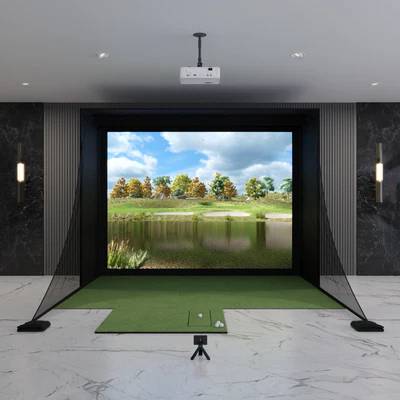
Garmin Approach R10 DIY Golf Simulator Package
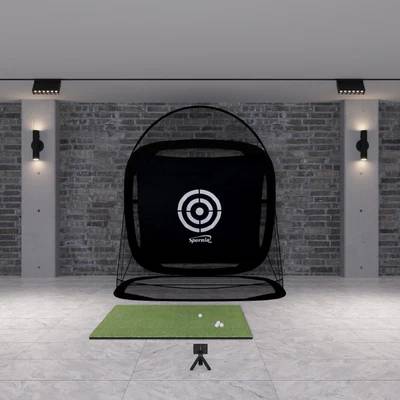
Garmin Approach R10 Spornia Practice Package
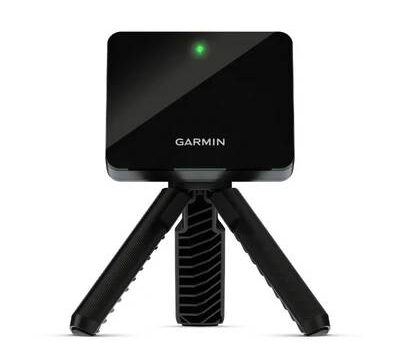
Garmin Approach R10 Practice Package
Garmin Simulator Packages — R10 vs. R50 Paths
Garmin simulator packages now split into two practical buying paths: the lower-cost Approach R10 family and the more advanced Approach R50 family. The difference is not just price — it is simulator depth, measurement method, and how complete the experience feels without extra hardware.
Garmin Approach R10 Packages
Indoor Golf Outlet currently lists Approach R10 Practice, Approach R10 DIY Golf Simulator Package, and Approach R10 SIG Golf Simulator Package. The R10 path is best for golfers who want Garmin simulator access at a lower entry point and are comfortable using the Garmin Golf app and projector/TV-based workflows for simulator play.
Garmin Approach R50 Packages
Indoor Golf Outlet currently lists Approach R50 Practice Package, Approach R50 DIY Golf Simulator Package, Approach R50 SIG Golf Simulator Package, and Approach R50 Pro Golf Simulator Package. The R50 path is Garmin’s premium simulator direction, with its own built-in screen experience, three-camera measurement system, impact videos, and broader “standalone simulator” feel.
What All Garmin Packages Share
Both Garmin simulator lines are built around portable launch monitors rather than overhead ceiling systems. That means Garmin is best understood as a flexible portable simulator brand, not a fixed overhead studio brand. If your priority is ceiling mounting, compare against our overhead launch monitors category instead.
Garmin Simulator Technology — Approach R10 vs. Approach R50
| Current simulator families on Indoor Golf Outlet | Approach R10 and Approach R50 |
| Approach R10 positioning | Portable launch monitor with Garmin Golf app, Home Tee Hero, swing video capture, and more than 42,000 virtual courses via Garmin ecosystem support |
| Approach R50 positioning | Premium golf simulator and launch monitor with built-in 10" color touchscreen, 3 high-speed cameras, impact videos, and more than 15 direct ball and club metrics |
| Approach R50 course play | 43,000+ courses with Home Tee Hero, drive-to-putt play, up to four players, subscription required |
| Approach R50 direct metrics | Official Garmin page lists direct measurements of more than 15 ball and club metrics, including ball speed, launch angle, spin rate, spin axis, club speed, and club angles |
| Approach R50 club tracking note | Included club tracking stickers are required for certain club metrics according to Garmin’s official product page |
| Approach R50 battery life | Up to 4 hours |
| Approach R10 key simulator support | Garmin support and official Garmin forum materials confirm Home Tee Hero / Garmin Golf Simulator access, weekly tournaments, swing videos, and E6 CONNECT compatibility |
| Best category fit | Portable simulator ecosystem, not overhead studio hardware |
Which Garmin Simulator Type Fits Your Room and Goals?
Choose R10 If You Want the Lower-Cost Garmin Entry Point
The Approach R10 is the right Garmin simulator path if your intent is lower cost, portable use, Garmin Golf app workflow, and basic simulator access with Home Tee Hero and E6 support. It is the natural starting point for golfers moving from practice into simulator play without jumping into Garmin’s premium tier immediately.
Choose R50 If You Want Garmin’s Premium Simulator Path
The Approach R50 is the better Garmin route if you want a stronger standalone simulator experience, direct club-and-ball measurements, a built-in touchscreen workflow, impact videos, and full drive-to-putt Home Tee Hero play on 43,000+ courses.
Choose Practice vs. DIY/SIG Based on Build Intent
Garmin practice packages are the better fit when you want fast setup and data-driven reps. Garmin DIY and SIG packages are the better fit when you want a true enclosure-and-projector simulator room. The package choice should come after the R10 vs. R50 decision, not before it.
Do Not Choose Garmin If You Need Ceiling-Mounted Hardware
Garmin is not the right path if your requirement is an overhead launch monitor fixed above the hitting area. In that case, compare instead with our overhead launch monitors category.
Garmin Simulators FAQ
What launch monitors power Garmin simulator packages?
The current Garmin simulator category is built around two portable launch monitor families: Approach R10 and Approach R50. Indoor Golf Outlet currently lists simulator packages for both product lines.
How many courses can Garmin simulator users play?
Garmin’s official materials for the Approach R50 state that Home Tee Hero supports play on more than 43,000 courses with an active subscription. Official Garmin forum materials for the Approach R10 reference more than 42,000 courses through the Garmin Golf simulator ecosystem, so the exact wording depends on product generation and source.
Does Garmin Approach R50 require club stickers?
Yes, Garmin’s official R50 product page notes that included tracking stickers are required for certain club metrics. Because of that, it would be inaccurate to describe the R50 as completely sticker-free.
Is Garmin better for portable simulator use or fixed studio installs?
Garmin is better understood as a portable simulator ecosystem. Both R10 and R50 are portable launch-monitor-based paths. They can sit inside full DIY and SIG room builds, but the core hardware intent is still portability rather than overhead studio installation.
Key Features of Our Garmin Indoor Golf Simulators
Garmin Simulators — Key Specs & Selection Criteria
Four attributes make Garmin the right simulator brand for a specific buyer: a clear R10 vs. R50 upgrade path, portable launch monitor flexibility, Garmin’s Home Tee Hero virtual play ecosystem, and package options that scale from practice setups to full DIY and SIG room builds.
R10 to R50 Brand Ladder
Garmin now has a more visible two-step simulator ladder than the current GolfSimPlanet page suggests. The R10 serves the lower-cost entry point, while the R50 is Garmin’s premium portable simulator and launch monitor with built-in touchscreen play and stronger direct measurement claims.
Portable Simulator Flexibility
Garmin’s simulator identity is built around portability. These are not fixed overhead launch monitors. That makes Garmin attractive for golfers who want one device that can move between practice workflows and home simulator builds rather than a permanent ceiling-mounted room.
Home Tee Hero Simulator Ecosystem
Garmin’s simulator value is not only hardware-based. Home Tee Hero is a major part of the buying story, with official Garmin sources describing virtual course play, weekly tournaments, and broad course libraries tied into the Garmin Golf ecosystem.
Practice Package to Full Room Build
Indoor Golf Outlet’s current Garmin collection shows that the same brand can support practice packages, DIY enclosure builds, SIG packages, and for R50 even a Pro package. That means the category should guide the user by room intent, not just by device name.
📋 Garmin is strongest when you want a portable simulator path with a clear brand upgrade ladder. Choose R10 for lower-cost entry, or R50 for Garmin’s more premium simulator experience.
Why Choose Us When You Shop Garmin?
Why Buy a Garmin Simulator from GolfSimPlanet?
Garmin is one of the categories where a thin brand page quickly becomes outdated, because the real commercial decision is not just “Do I want Garmin?” but “Do I want R10 or R50, and do I want practice, DIY, SIG, or premium room-build packaging?” GolfSimPlanet can make this page genuinely useful by positioning it as a bridge page inside the cluster — linking users into the right next-step pages for portable launch monitors, launch monitors, software, short throw projectors, and the broader golf simulators hub. That turns the page into a real category decision page instead of a dated R10-only brand page.