

Table of Contents
Core Hardware Requirements
What types of sensors are necessary for an indoor golf simulator?
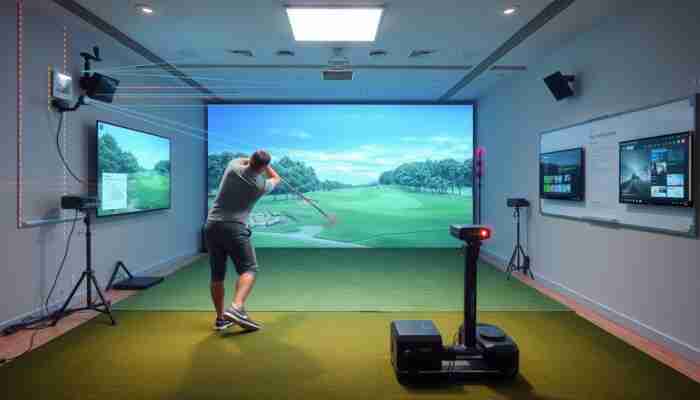
Indoor golf simulators are effective tools for practicing golf because they provide accurate swing data, which matters for improving players’ skills. Capturing swing data accurately begins with the right sensors. The primary types of sensors include infrared, camera-based, and capacitance sensors.
Infrared sensors utilize beams of light to measure club head speed and angle. This ensures precise data collection even in varied lighting conditions. Camera-based sensors leverage high-speed imaging to analyze swings, providing comprehensive insights into a player’s technique. This technology not only offers reliable feedback but also generates visual representations of swing analyses, enhancing the overall experience.
Capacitance sensors can be integrated to detect contact between the club and the ball, improving data accuracy. These sensors work effectively in diverse environments, accommodating different room sizes and layouts. Real-time feedback mechanisms allow users to instantly see the effects of their adjustments, fostering a more integrated learning process.
- Infrared sensors measure club head speed and angle.
- Camera-based sensors analyze swings with high-speed imaging.
- Capacitance sensors detect club-ball contact for improved accuracy.
- Real-time feedback enhances the learning process.
- Consider factors like accuracy, latency, and calibration ease.
What are the projector and screen specifications for a home golf simulator?
The choice of projector and screen is critical for a home golf simulator. A quality projector should have at least 1080p resolution for clear, sharp images. This clarity is essential for distinguishing details on simulated golf courses. Additionally, consider lumens ratings; for a home environment with controlled lighting, a projector with 2,000 lumens may suffice. However, in brighter settings, 3,000 lumens or more is recommended for optimal visibility. For a variety of options, check out our guide on Indoor Golf Simulators for Sale.
Screen size and aspect ratio significantly influence the overall experience. A wide screen, ideally with a 16:9 aspect ratio, allows for a more expansive view of virtual courses. When selecting a screen, consider materials that reduce glare and enhance color contrast, such as high-gain screens designed for projection. Compatibility with the specific projector model is also crucial for maximizing image quality.
Integration with ambient lighting solutions can further augment the experience. Adjustable LED lighting behind the screen creates a seamless atmosphere, immersing players in their virtual golfing environment. Pairing the right projector with a suitable screen elevates home practice sessions to new heights.
- Projector should have at least 1080p resolution.
- Consider lumens ratings based on lighting conditions.
- Wide screen with 16:9 aspect ratio enhances realism.
- Materials that reduce glare improve image quality.
- Integrate ambient lighting for an immersive experience.
What are the key features of a quality hitting mat?
A high-quality hitting mat is integral to the overall effectiveness of a home golf simulator. For an optimal experience, consider the following key features:
- Durability: Mats should be made from high-quality synthetic fibers that withstand repeated impacts.
- Realistic Turf Feel: Mats mimicking natural grass enhance the practice experience.
- Shock Absorption: Built-in cushioning reduces strain on joints during long practice sessions.
- Stability: Non-slip backing keeps mats firmly in place during swings.
- Portability: Lightweight and foldable mats are easy to store.
- Adjustability: Some mats allow for adjustable tee heights to simulate different course conditions.
Choosing a mat with these features ensures realistic practice sessions that translate well to real-world golfing scenarios. Regular maintenance, such as cleaning and proper storage, will also contribute to the longevity of hitting mats.
What are the computing hardware specifications for a home golf simulator?
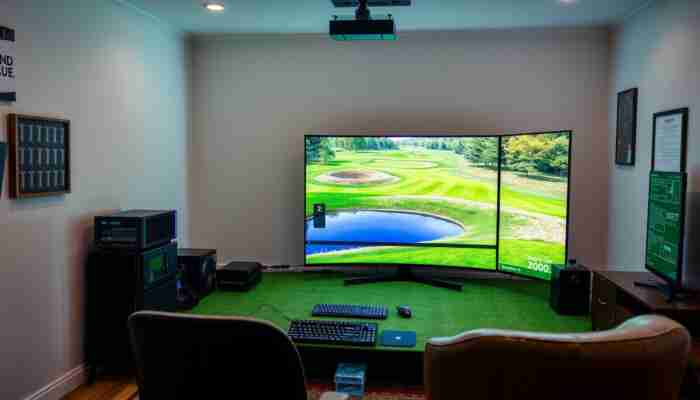
To ensure smooth operation of a home golf simulator, the computing hardware specifications must meet certain performance benchmarks. At the core, a multi-core CPU is essential. Look for at least a quad-core processor, such as an Intel i5 or AMD Ryzen 5, to manage data processing needs efficiently.
The GPU is equally crucial; a dedicated graphics card with at least 4GB of VRAM is recommended. Models like the NVIDIA GeForce GTX 1650 or AMD Radeon RX 5500 can provide the necessary power for real-time graphics rendering, enhancing immersion.
Memory, or RAM, should not fall short of 16GB to ensure smooth performance when processing high-resolution graphics. Opting for a solid-state drive (SSD) for storage significantly improves load times and overall responsiveness.
- Multi-core CPU is essential for data processing.
- Dedicated GPU with at least 4GB of VRAM is recommended.
- 16GB of RAM ensures smooth performance.
- SSD storage improves load times and responsiveness.
- Power efficiency is important for frequent users.
What are the audio system requirements for an immersive experience?
An immersive audio experience is critical for a home golf simulator. The audio system should include quality speakers that deliver clear and dynamic sound. This allows users to hear distinctive sounds of club strikes, ball impacts, and environmental effects during simulated play.
For a truly enveloping experience, consider a surround sound system. This setup creates a spatial audio environment that mimics sounds of a real golf course. Look for systems with multi-channel capabilities to position sound appropriately based on visual cues.
Additionally, noise cancellation options enhance focus during practice. Select speakers that minimize background noise, ensuring players remain immersed in their practice. Integrating an audio system compatible with the simulator’s software allows for seamless volume adjustments.
- Quality speakers deliver clear and dynamic sound.
- Surround sound systems create a spatial audio environment.
- Multi-channel capabilities enhance sound positioning.
- Noise cancellation options improve focus during practice.
- Compatibility with software allows for seamless adjustments.
How Does Software Integration Work?
What are the key software functions for simulation?
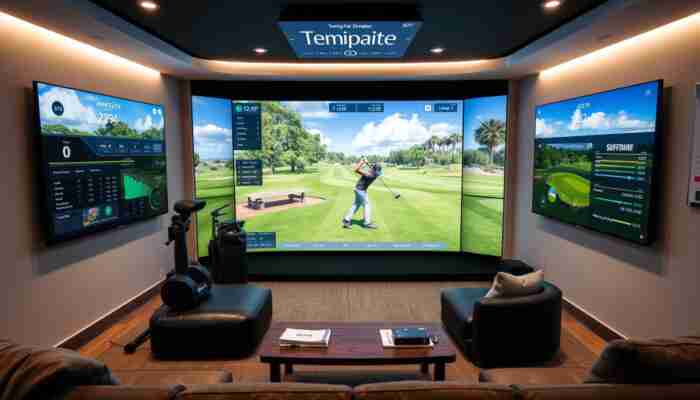
Effective software integration is critical for maximizing the benefits of a home golf simulator. The software must process raw data from sensors and translate this into an immersive virtual experience. Key functions include data analytics, which track player performance metrics like swing speed, angle, and ball trajectory. For more insights on selecting the right equipment, check our Buying Guides. For more information on selecting the right equipment, check out our guide on golf simulators. For those interested, No-Ball Golf Simulators for Home offer a unique alternative for indoor practice. For an immersive experience, consider a VR Golf Simulator that enhances your practice sessions.
User-friendly interfaces are essential for simulation software. A well-designed interface enables easy navigation, customization of settings, and access to various virtual golf courses. Players can adjust parameters like weather conditions and course difficulty, creating a personalized experience.
Regular updates and patches to the software are crucial. Developers frequently release enhancements that improve functionality and introduce new features. This continuous development ensures that the simulator remains engaging over time, preventing stagnation in user experience.
- Software processes raw data for an immersive experience.
- User-friendly interfaces enhance navigation and customization.
- Regular updates improve functionality and engagement.
- Data analytics track performance metrics for targeted practice.
- Progress tracking features help monitor improvements over time.
How does compatibility with devices enhance the experience?
Seamless compatibility between software and hardware is pivotal for smooth functioning of home golf simulators. Users should ensure that the simulator’s software can effectively communicate with various sensors, projectors, and computers. This typically involves checking system requirements for compatibility.
Many modern golf simulators utilize wireless connections, simplifying the integration process. This technology allows for easy pairing of devices, enhancing mobility and reducing cable clutter. Users can connect tablets or smartphones to control settings or view performance metrics, making the experience more interactive.
Cloud integration significantly enhances user experience. This feature allows golfers to save data online, share progress, and access updates remotely. It facilitates broader community engagement, enabling users to join virtual tournaments or share insights with fellow golf enthusiasts.
- Compatibility ensures smooth functioning of hardware and software.
- Wireless connections simplify integration and reduce clutter.
- Mobile devices enhance interactivity and control.
- Cloud integration allows for data sharing and community engagement.
- Check system requirements for seamless operation.
What are the benefits of regular updates and patches?
Regular software updates and patches are essential for maintaining the performance and relevance of a home golf simulator. These updates resolve bugs, enhance existing features, and introduce new functionalities, keeping the simulation fresh and engaging.
One primary benefit of regular updates is improved performance. Developers optimize algorithms that process sensor data and render graphics, resulting in smoother gameplay and more accurate feedback mechanisms. Continuous improvements in software help refine users’ techniques and enhance their learning curves.
As golfing technology advances, updates allow users to access the latest features without needing to invest in new setups. New virtual courses, enhanced graphics, and innovative training tools can be added through updates, providing fresh challenges and experiences.
- Updates resolve bugs and enhance existing features.
- Improved performance results from optimized algorithms.
- Access to the latest features without new investments.
- Regular updates prevent compatibility issues.
- Engaging experiences help keep users motivated.
Expert Insights on Essential Components for a Home Golf Simulator
What are the actionable steps for setup?
Setting up a home golf simulator requires careful planning and execution. Begin by choosing an appropriate space with ample room for a full swing. Measure dimensions to determine the best layout for your setup, considering height and width for the projector and screen.
Next, select high-quality components that align with your performance needs and budget. Assemble the hardware components systematically. Start with the hitting mat, ensuring it is secured in a stable position. Follow this by setting up the sensors, placing them strategically to capture data effectively.
Connect the projector and screen, calibrating the image for clarity and size. After hardware setup, move on to software installation, following the manufacturer’s guidelines. Input calibration settings to align sensors with projected visuals accurately.
- Choose an appropriate space for setup.
- Measure dimensions for optimal layout.
- Select high-quality components within budget.
- Assemble hardware components systematically.
- Calibrate sensors and visuals for accuracy.
What factors influence component quality?
Quality is paramount when selecting components for a home golf simulator. Several factors influence the longevity and effectiveness of each part, starting with materials. Opt for durable options, such as high-grade plastics or metals for sensor casings.
Warranties and customer support are key indicators of component quality. Look for manufacturers offering reasonable warranties, reflecting their confidence in durability and performance. A robust warranty provides peace of mind and safeguards your investment.
Customer reviews and expert opinions reveal potential strengths and weaknesses in specific components. Online communities of golf enthusiasts share experiences, offering valuable information about equipment performance. Evaluate the reputation of brands within the simulator space for reliability.
- Durable materials ensure longevity of components.
- Warranties reflect manufacturer confidence in quality.
- Customer reviews provide insights into performance.
- Reputable brands often deliver reliable products.
- Consider expert opinions from golf communities.
Why does calibration matter for accuracy?
Calibration is essential for ensuring that a home golf simulator delivers accurate feedback. Proper calibration aligns sensor readings with actual performance, allowing users to receive meaningful insights into their swings. Without accurate calibration, discrepancies may arise between real-life performance and simulator data.
To achieve optimal calibration, follow the manufacturer’s guidelines for each component. Adjust settings based on your space’s specific dimensions and ensure sensors are correctly placed relative to the hitting mat and ball. Regular recalibration is necessary, especially after moving or adjusting the setup.
Expert techniques for calibration include using reference points, such as alignment sticks, to ensure accurate detection of swing paths. Trial swings can help fine-tune settings, allowing users to visualize data in real-time and make adjustments accordingly.
- Calibration ensures accurate feedback and data.
- Follow manufacturer guidelines for optimal settings.
- Regular recalibration is necessary for accuracy.
- Use reference points for precise detection.
- Trial swings help fine-tune settings effectively.
What maintenance strategies ensure longevity?
Maintaining a home golf simulator is crucial for ensuring longevity and optimal performance. Establish regular cleaning routines to keep components in top condition. Wipe down hitting mats and sensor surfaces with appropriate cleaners to prevent buildup that may hinder performance.
Routine inspections of hardware components are equally important. Regularly check sensors for signs of wear or misalignment, as these can impact data accuracy. Inspect the projector and screen for dust accumulation or scratches that might affect image quality.
Troubleshooting common issues is also integral to maintenance. Familiarize yourself with common problems, such as connectivity errors or software glitches. Having a reliable support resource can help users resolve issues quickly.
- Establish regular cleaning routines for components.
- Inspect sensors for wear or misalignment.
- Check projector and screen for dust and scratches.
- Troubleshoot common issues proactively.
- Utilize reliable support resources for quick resolutions.
How can budgeting lead to cost-effective options?
Creating an effective home golf simulator without overspending requires strategic budgeting and informed decision-making. Begin by outlining a realistic budget that accounts for essential components, including hardware, software, and accessories. Prioritize purchases based on immediate needs, such as sensors and a hitting mat.
Seek out cost-effective options that do not compromise on quality. Many reputable brands offer durable hitting mats and sensors at competitive prices. Shopping during sales events can yield significant savings without sacrificing quality.
Consider second-hand equipment or refurbished products as budget-friendly alternatives. Many golf enthusiasts upgrade their systems and sell previous components, offering opportunities to acquire high-quality gear at reduced prices.
- Outline a realistic budget for essential components.
- Prioritize purchases based on immediate needs.
- Seek cost-effective options without compromising quality.
- Shop during sales for significant savings.
- Consider second-hand or refurbished products for budget-friendly alternatives.

Abigail Turner is a passionate writer and golf enthusiast specializing in indoor golf simulators. With a keen eye for detail and a deep understanding of the technology behind these platforms, she provides insightful content that helps players maximize their indoor golfing experience. Abigail’s engaging articles cover everything from equipment reviews to tips for improving one’s game, making her a go-to resource for both beginners and seasoned players alike.


Discussion