Table of Contents
- What “Projector Accuracy” Really Means in a Golf Simulator
- The 6 Projector Factors That Most Affect Virtual Golf Accuracy
- Short Throw vs Normal Throw: Which Helps More?
- How to Set Up a Projector for Better Simulator Accuracy
- Common Projector Mistakes That Hurt Virtual Golf Accuracy
- Best Next Step Based on What You Need
- FAQ
- Conclusion
Golf Simulator Projector Guide
Golf Simulator Projector Setup: How to Improve Virtual Golf Accuracy
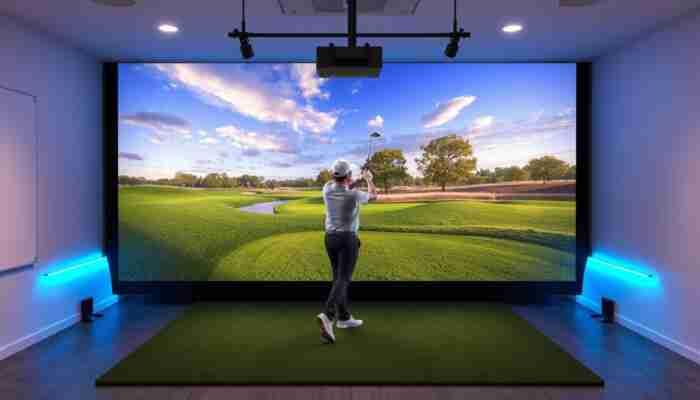
A golf simulator projector does more than make the room look impressive. It affects how clearly you see the target line, how naturally the course appears on screen, and how accurate the whole simulator experience feels during play and practice.
That matters because virtual golf accuracy is not only about launch monitor data. It is also about whether the image is correctly sized, properly aligned, bright enough for the room, and matched to the screen without distortion. A poor projector setup can make even a strong simulator feel less precise than it really is.
If you are still comparing the main equipment categories, start with
projectors,
short throw projectors,
projector mounts,
and
simulator screens
first.
Quick answer
The best golf simulator projector setup improves virtual golf accuracy by matching the throw ratio, brightness, resolution, screen size, and mounting position to the room. Accuracy feels strongest when the image fills the screen correctly, stays sharp, avoids heavy keystone correction, and remains easy to see under real indoor lighting conditions.
What “Projector Accuracy” Really Means in a Golf Simulator
A projector does not change the raw launch data coming from the simulator. What it changes is how accurately that data is presented to your eyes. If the projected image is stretched, dim, off-center, or poorly fitted to the screen, the virtual golf experience stops feeling precise.
In practical terms, projector accuracy means the course image looks natural, the target line feels believable, and the visual feedback supports what the simulator is actually calculating. That is why projector choice matters more than many buyers expect.
A projector setup feels accurate when…
- the image fits the screen correctly
- the picture stays sharp and readable
- the target line looks natural
- the room lighting does not wash everything out
- you do not notice visual distortion during play
A projector setup feels inaccurate when…
- the image does not fill the screen cleanly
- the picture looks dim or muddy
- keystone correction is doing too much work
- text, lines, and course details look soft
- the visual layer feels disconnected from the shot result
The 6 Projector Factors That Most Affect Virtual Golf Accuracy
1. Throw ratio and image fit
Throw ratio decides how far the projector needs to sit from the screen to create the right image size. This is one of the biggest practical issues in simulator rooms, because a projector that does not match the space often creates a poor fit or forces awkward mounting.
In many home simulator rooms, a
short throw projector
is the better fit because it can create a large image from a shorter distance and reduce shadow issues in the hitting area.
2. Brightness
Brightness controls how visible and convincing the image stays under actual room conditions. If the projector is too dim for the space, virtual golf loses clarity and depth, especially when there is any ambient light in the room.
3. Resolution and sharpness
Resolution matters because soft visuals make it harder to trust the image. A sharper projector gives cleaner course details, crisper lines, and a more convincing display overall. That does not automatically mean everyone needs the highest-end model, but poor clarity can definitely hurt perceived accuracy.
4. Screen match and aspect fit
The projector and the impact screen need to work together. If the screen ratio and the projected image do not match well, the setup can feel off even when the simulator data itself is good. This is why
simulator screens
matter as much as the projector.
5. Mounting position and alignment
A badly mounted projector creates distortion, image drift, and geometry problems that often get “fixed” with too much digital correction. A cleaner physical alignment almost always produces a better result than relying heavily on software fixes.
That is why
projector mounts
are not a small accessory detail. They are part of the performance system.
6. Signal quality from software and computer
A projector can only display what it receives. If the simulator computer or software setup is weak, the image layer can still feel less clean and less stable than it should. That is why
software
and
golf simulator computers
also affect the final visual result.
| Factor | Why it matters | What usually goes wrong |
|---|---|---|
| Throw ratio | Controls image size and room fit | Projector does not suit the space |
| Brightness | Keeps the image visible and convincing | Image looks washed out |
| Resolution | Improves clarity and realism | Soft image reduces confidence |
| Screen fit | Keeps the image proportional | Stretched or poorly filled screen |
| Mounting alignment | Reduces distortion | Too much keystone correction |
| Signal quality | Supports stable visual performance | Image feels less clean than it should |
Short Throw vs Normal Throw: Which Helps More?
This depends mostly on the room. A short throw projector is often the better choice when space is limited or when you want to reduce the risk of shadows in the hitting zone. A normal throw projector can still work well in a larger room where mounting flexibility is easier and geometry is simpler to control.
The key is not choosing short throw because it sounds more advanced. The key is choosing the throw type that actually fits the room and screen correctly.
| Room situation | Better direction | Why |
|---|---|---|
| Smaller room or tighter depth | Short throw projector | Better fit from shorter distance |
| Larger room with more mounting freedom | Normal throw projector | Can work cleanly when space allows |
| High concern about shadows and player position | Short throw projector | Usually reduces image obstruction risk |
How to Set Up a Projector for Better Simulator Accuracy
A better setup sequence
- Measure the room and the screen first
- Match the projector throw ratio to that room
- Position the mount for clean image geometry
- Minimize keystone correction whenever possible
- Tune brightness and image fit under real room lighting
- Test the setup with actual simulator software before finalizing everything
Common Projector Mistakes That Hurt Virtual Golf Accuracy
Best Next Step Based on What You Need
If you want to compare projector options directly
Start with the main projector collection.
If your room is tighter or shadow control matters most
Review short throw projectors first.
If image alignment is your biggest concern
Look at projector mounts before finalizing the setup.
If screen fit is the weak point in the room
Compare simulator screens to improve the full image system.
FAQ
Does a projector affect golf simulator accuracy?
It affects perceived simulator accuracy, not the raw shot calculation itself. A better projector setup makes the image clearer, better aligned, and more believable, which improves how accurate the whole simulator experience feels.
What matters more: brightness or resolution?
Both matter, but the better choice depends on the room. In a room with more ambient light, brightness becomes critical. In a darker controlled room, resolution and clarity may matter more once brightness is already sufficient.
Is a short throw projector better for golf simulators?
Often yes, especially in smaller rooms or when you want to reduce shadow problems. But it is only better when it fits the room and screen more cleanly than the alternatives.
Can a bad projector setup make a good simulator feel worse?
Absolutely. A dim, distorted, or badly fitted image can make the simulator feel less precise, even when the underlying launch monitor and software are strong.
Should I use keystone correction to fix the image?
Small adjustments are normal, but it is usually better to improve the projector’s physical position first. Heavy keystone correction can reduce image quality and make the setup feel less precise.
What is the biggest mistake when choosing a golf simulator projector?
The biggest mistake is choosing the projector before understanding the room, screen, and mounting logic. That usually leads to avoidable problems with fit, distortion, and weak visual performance.
Conclusion
A golf simulator projector should not be treated like a generic AV accessory. It is part of the performance system. When the projector, screen, mount, and room geometry fit together properly, the simulator feels sharper, more natural, and more trustworthy.
The smartest way to improve virtual golf accuracy is to stop thinking about the projector as a standalone product and start thinking about it as part of the full image chain. That is how you end up with a simulator room that looks better, feels better, and performs more convincingly every time you play.

Megan Thompson is an accomplished author and expert on indoor golf simulators, dedicated to helping golf enthusiasts enhance their game at home. With a passion for technology and sports, she explores the latest advancements in simulation equipment and offers insightful tips for players of all skill levels. Her engaging writing not only demystifies the complexities of indoor golf but also highlights its benefits for training and recreation, making her a trusted voice in the industry.
Discussion
24 Responses
This is a great reminder of how crucial the right projector setup can be for a satisfying golf simulation experience. I noticed a huge difference when I upgraded my short throw projector and ensured that everything was aligned properly. It really enhanced the immersive feel of playing at home.
You’ve hit the nail on the head there. Upgrading to a short throw projector can feel a bit like trading in a bicycle for a sports car when it comes to golf simulation. Suddenly, you’re not just squinting at the screen; you’re in a whole new world—one where the sound of your club striking the ball sounds like a symphony rather than a muffled ‘thud.’
“Absolutely! A proper setup truly makes all the difference. If you’re looking to elevate your own setup, check out some great options here!”
https://golfsimplanet.com/SIG10GolfSimulatorEnclosure
This is such a crucial aspect of setting up a golf simulator! I’ve been diving into my own setup recently, and I didn’t realize how much the choice of projector could really impact the whole experience.
You’re totally right about the projector making a big difference. It’s one of those things that can sneak up on you when you’re focused on setting up a golf simulator. I went through the same process, and I was surprised how much the light output and resolution changed the feel of the whole setup. Depending on the ambient light in your space, you might find that a brighter projector can really bring everything to life.
Absolutely! The right projector can make all the difference in your experience. If you’re looking for some great options, check out this guide to find the perfect fit for your setup!
https://golfsimplanet.com/CarpetPanelGapPadGolfSimulatorAccessory
I really appreciate the detailed breakdown you’ve provided on the importance of projector setup for enhancing the golf simulator experience. It’s fascinating how much nuance there is in creating a virtual environment that feels genuinely immersive. I can relate to the challenges of achieving that perfect balance between projector, screen, and room geometry. A few years ago, I set up a DIY golf simulator in my garage, and I learned the hard way just how critical the right projector can be.
It’s great to hear you found the breakdown helpful! Setting up a golf simulator can be quite the adventure, and your experience with the DIY setup in your garage really highlights just how much trial and error can go into it. It’s easy to underestimate how crucial the right projector is until you’ve gone through the hassle of various configurations and realized how drastically it can impact your experience.
This is a solid breakdown of what really matters when setting up a golf simulator projector. I’ve had my own fair share of struggles trying to get everything lined up perfectly—a few misalignments in the projector really threw off my practice sessions, making even my best swings feel inconsistent.
It’s interesting to consider how much the projector truly impacts the overall golf simulator experience. I remember when I set up my own simulator; I was initially focused on getting a high-quality launch monitor, believing that the accuracy would solely depend on that data. It wasn’t until I invested in a good short throw projector that I realized how critical visual clarity is for my game.
Your exploration of golf simulator projectors shines a spotlight on an often-overlooked aspect of virtual golfing that can significantly enhance the overall experience. The precision of the projected image truly can transform the practice of golf into something much more immersive and realistic. I’ve had my share of frustrations with subpar setups that diluted my engagement, so I can personally relate to your point about how crucial the projector’s alignment and brightness are for achieving an authentic feel.
It’s great to hear that you resonate with the challenges of subpar setups in golf simulation. The nuances of projectors—like their alignment and brightness—do play a significant role in shaping the experience, and it’s often an area that newbies overlook until they find themselves frustrated on the virtual green. I completely understand where you’re coming from, as I’ve experienced the letdown that arises when the technology fails to meet expectations.
This is such an interesting topic, especially as virtual golf becomes more popular. I’ve spent quite a bit of time researching projectors and their impact on simulator experiences. It’s fascinating how the setup can drastically change the feel of the game. I’ve personally found that even small adjustments, like the projector’s brightness and alignment, can make a huge difference in immersion.
Your insights into the importance of projector setup for golf simulators resonate deeply, particularly as more enthusiasts look to create immersive and accurate at-home experiences. The critical emphasis on not just the technology itself but how effectively it all integrates within the environment is often overlooked by those new to the simulator world.
This post really highlights the crucial role of a projector in creating a realistic simulator experience. I’ve set up a mini golf area in my basement, and I initially underestimated how much a quality projector could impact my game. Once I upgraded to a short throw projector, the clarity and alignment improved significantly, making it feel like I was actually on the course.
What a delightful dive into the world of golf simulators and projectors! It’s fascinating how much the right tech can influence not just the accuracy of a swing, but the entire immersive experience. I must admit, I used to think I could just slap any projector onto a wall and call it a day. Oh, naive days of my early golfing dreams!
Your points on the interaction between the projector, screen, and room geometry really resonate with me. It’s fascinating how such technical elements can influence the overall feel of the game—almost like how lighting affects the mood in a room. I recently set up a simulator at home and spent way too long adjusting the projector settings to get the colors just right. It’s wild how a slight misalignment can turn an immersive experience into something that feels off. Have you experimented with different projector types, or do you have any favorites that you’ve found work best for golf simulations?
Your breakdown of the importance of projector setup in golf simulators brings an essential nuance to the discussion of virtual golf accuracy. It’s fascinating to consider how much the hardware influences not only our perception of the game but also the enjoyment of practice.
It’s fascinating how closely the setup of a golf simulator relates to the overall experience and accuracy! I recently invested in a short throw projector, and I’ve noticed a significant difference in how immersive the game feels. The clarity of the image and the precise alignment with the screen really does enhance not just the accuracy but also the enjoyment factor.
This guide to golf simulator projectors really highlights some key aspects that many might overlook when setting up their virtual golf experience. I completely agree that the projector and its setup can significantly impact the overall realism and accuracy of a simulator. It’s fascinating how nuanced this technology has become—adjusting things like image alignment and brightness can drastically alter the feel of the game.
You’ve touched on something really important—how the nuances of projector settings can shape the whole experience. It’s easy to overlook the technical side when you’re just itching to play a round of golf. Getting the image aligned perfectly and fine-tuning the brightness can feel tedious, but it pays off. It’s interesting to see how even small adjustments can make your virtual course feel more immersive, almost like stepping onto a real fairway. Have you experimented with any specific settings in your setup that made a noticeable difference? Sharing those tips could really help others in crafting their ideal experience.
This guide brings up some valuable points about the importance of projector quality in achieving a realistic golf simulation experience. I think it’s fascinating how much of an impact the right projector can have—not just in terms of clarity and brightness, but also how it can affect our perception of the game itself. I remember setting up my own simulator and initially struggled with alignment issues, which made everything feel off, even though the launch monitor numbers looked good. Once I invested the time in properly configuring the projector and the screen, it transformed my experience.
You bring up a really important point about the projector setup and its role in creating a realistic golf simulation experience. I used to think that just having a good simulator was enough, but I quickly learned how crucial the proper projector alignment and brightness can be. When I first set mine up, I overlooked the screen size and ended up with a distorted image that made it hard to focus on my swing.
Your commentary on the importance of projector setup in enhancing the virtual golf experience is spot-on. It’s intriguing how often the subtleties of equipment influence performance perceptions. I’ve spent a fair amount of time trying to optimize my own home setup, and it became evident that even minor adjustments to projector placement or screen calibration can significantly impact accuracy and immersion.
It’s fascinating how the setup of a golf simulator projector can really enhance the entire experience. I’ve found that properly aligning and calibrating the projector not only improves the visuals but can also boost my confidence during practice. For instance, switching to a short throw projector made a noticeable difference in reducing shadows on the screen, making my swings feel more realistic.
It’s interesting how many aspects of golf simulators depend on factors that might initially seem secondary, like the projector setup. When I first invested in my simulator, I was primarily focused on the launch monitor and hitting surface, but I quickly learned how crucial the projector’s brightness and alignment are to achieving a realistic experience. I remember playing on a poorly set-up projector where the image was distorted and made it difficult to judge distances accurately, which diminished my practice sessions significantly.