
Table of Contents
- What Golf Simulator Swing Analysis Actually Tells You
- Which Swing Metrics Matter Most?
- How to Read Swing Data the Right Way
- Common Mistakes Golfers Make With Swing Analysis
- How to Turn Swing Analysis Into Better Practice
- What Type of Setup Is Best for Swing Analysis?
- Best Next Step Based on What You Need
- FAQ
- Conclusion
Swing Analysis Guide
Golf Simulator Swing Analysis: How to Use Data to Improve Your Game
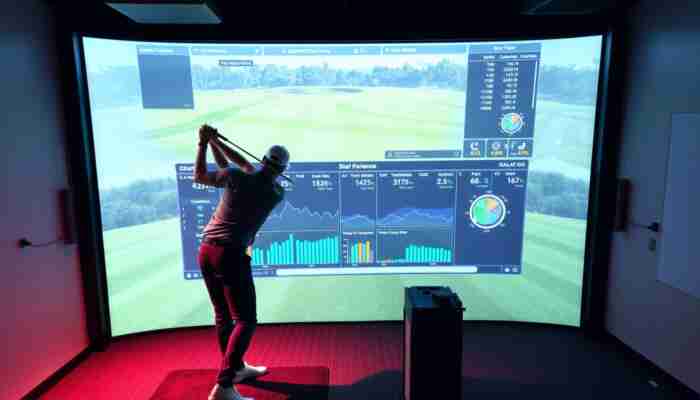
A golf simulator can do much more than show ball flight on a screen. Used properly, it becomes one of the clearest ways to understand how your swing actually behaves. The real value is not in collecting endless numbers. It is in learning which swing data matters, what it means, and how to turn it into better practice.
Good swing analysis helps you move beyond guesswork. Instead of assuming why a shot curved, launched too low, or came off the face poorly, you can use simulator feedback to spot patterns and make smarter changes. That is what turns indoor sessions into real game improvement.
If you are still choosing the right tech for this kind of feedback, start by comparing
launch monitors,
golf swing cameras,
golf simulator software,
and
golf simulator computers.

Quick answer
Golf simulator swing analysis works best when you focus on a small group of useful metrics, understand what they mean together, and apply them to structured practice. The goal is not more data. The goal is better decisions about club path, face angle, strike quality, launch, and consistency.
What Golf Simulator Swing Analysis Actually Tells You
Swing analysis is valuable because it helps connect what you feel with what is really happening. Many golfers make changes based only on feel, but feel can be misleading. A simulator gives you a second layer of feedback: measurable evidence.
That evidence becomes useful when it explains ball flight, strike quality, and consistency. If the ball starts left, launches too low, or curves too much, the simulator helps show whether the issue came from club path, face angle, strike location, speed, or a combination of those factors.
Useful swing analysis helps you understand…
- why your ball starts where it does
- why it curves the way it does
- how consistent your strike really is
- whether changes are actually improving outcomes
- which metric deserves attention first
Weak swing analysis usually happens when…
- you chase every number at once
- you read metrics in isolation
- you change mechanics too quickly
- you confuse a single good shot with a real pattern
- you treat the simulator like entertainment only
Which Swing Metrics Matter Most?
Club path
Club path helps explain how the club is moving through impact. This is one of the most useful numbers for understanding shot shape and directional bias. It becomes even more useful when you compare it with face angle instead of reading it alone.
Face angle
Face angle often has a stronger effect on starting direction than golfers expect. If you want cleaner ball starts and less unpredictable curvature, this is one of the first places to pay attention.
Club speed and ball speed
These numbers help show how efficiently you are delivering the club and converting motion into output. More speed is not always better if the strike and face delivery are poor, but these metrics are very useful for benchmarking progress.
Launch angle and spin
These numbers help explain ball flight windows and distance behavior. They matter even more when you are trying to understand why shots come out too flat, too floaty, or fail to hold their intended line.
Strike quality and impact position
A simulator becomes much more valuable when it helps you see whether the issue is technique, delivery, or simply contact quality. Impact consistency is often the bridge between “good numbers sometimes” and “better golf more often.”
| Metric | What it helps explain | What golfers often do wrong |
|---|---|---|
| Club path | Shot shape tendency | Reading it without face angle |
| Face angle | Start direction and curve influence | Ignoring it while chasing speed |
| Club speed | Power potential | Treating more speed as the whole answer |
| Launch and spin | Flight window and carry behavior | Not connecting them to contact and delivery |
| Impact quality | Consistency and strike efficiency | Focusing on totals instead of contact pattern |

How to Read Swing Data the Right Way
The most useful way to read simulator data is to look for patterns, not for one-shot perfection. A single swing can be misleading. A repeated pattern tells you something you can actually work on.
Start by identifying one ball-flight problem you want to solve. Then look backward into the data to understand what is likely causing it. That creates a much better feedback loop than jumping between ten different metrics with no clear priority.
A simple data-reading sequence
- Start with the ball flight problem
- Check start direction and curvature
- Compare face angle and club path
- Review strike and launch behavior
- Make one change, not five
- Retest enough shots to confirm a pattern
Common Mistakes Golfers Make With Swing Analysis
How to Turn Swing Analysis Into Better Practice
Work on one problem at a time
Practice improves faster when the session has a clear purpose. A useful simulator session usually centers on one delivery issue, one shot shape issue, or one strike issue instead of trying to optimize everything at once.
Use video with numbers when possible
Visual context makes data more actionable. That is why
golf swing cameras
can add real value to a simulator setup. They help connect body movement with the numbers you are seeing.
Track repeatability, not only best swings
The right question is not “What was my best shot?” It is “What keeps happening?” Real performance improvement comes from narrowing bad patterns and stabilizing good ones.
Keep the setup aligned with the goal
If swing analysis is a real priority, the technology around the simulator matters. Stronger
launch monitors,
better
software,
and in some cases
simulator computers
can make a big difference in how clearly you can read your swing.

What Type of Setup Is Best for Swing Analysis?
| Goal | Best setup direction | Why |
|---|---|---|
| Basic feedback and frequent reps | Launch monitor-led setup | Fastest path into useful data |
| Deeper swing review | Launch monitor + swing camera setup | Numbers plus visual motion context |
| Full analysis room | Higher-end simulator environment | Best for long-term structured use |
Best Next Step Based on What You Need
If you want the core tech behind better swing feedback
Start with launch monitors.
If you want to pair data with visual motion analysis
Compare golf swing cameras.
If you want better dashboards, analytics, and training flow
Review golf simulator software.
If you want to compare full simulator paths
Start with golf simulators and choose the right analysis-ready setup.
FAQ
Can a golf simulator really help analyze your swing?
Yes. A good simulator can help analyze club delivery, ball behavior, strike quality, and recurring patterns. The key is knowing how to read the data instead of simply collecting it.
What metrics matter most in swing analysis?
Club path, face angle, club speed, ball speed, launch angle, spin, and strike quality are usually the most useful starting points. They matter even more when you read them together instead of separately.
Is more simulator data always better?
No. More data only helps when it supports a clear practice goal. Too many numbers without a process usually creates confusion instead of improvement.
Should I use swing cameras with simulator data?
In many cases, yes. Cameras can make simulator data much easier to understand because they show the motion behind the numbers.
What is the biggest mistake in swing analysis?
The biggest mistake is trying to fix everything at once. Better results usually come from choosing one pattern, using the right metrics to understand it, and testing one change at a time.
Can swing analysis improve real on-course performance?
Yes, especially when simulator feedback leads to more consistent contact, better delivery patterns, and clearer practice decisions that carry into real play.
Conclusion
Golf simulator swing analysis is most valuable when it helps you understand cause and effect. Better ball flight starts with better delivery, better strike, and better decisions about what to work on.
The smartest approach is to use the simulator as a learning tool, not just a shot counter. Focus on the right metrics, study patterns instead of one-shot outcomes, and build practice around clear feedback. That is how swing analysis turns into real improvement.

Ethan Reynolds is a passionate writer and enthusiast in the world of indoor golf simulators. With a keen eye for technology and a deep understanding of golf dynamics, he explores the intersection of sports performance and innovative simulation tools. Through his engaging articles, Ethan provides valuable insights and tips for golfers at all levels, helping them enhance their game while enjoying the convenience of home-based training.
Discussion
21 Responses
Your insights into the role of golf simulators in swing analysis really resonate with me, as I’ve recently started utilizing a simulator to refine my technique. The way you’ve highlighted that the true value lies not just in gathering data but in understanding and applying it to our practice is particularly compelling. It often feels overwhelming with the plethora of metrics available, and distinguishing which specific data points matter most can be a challenge.
I completely relate to your experience with golf simulators and the challenge of making sense of all that data. It’s so easy to get lost in the numbers—swing speed, launch angles, and spin rates can all feel a bit like alphabet soup, can’t they? What I’ve found helpful is to focus on just a few key metrics that align with your specific goals. For example, if you’re looking to improve accuracy, paying attention to your face angle at impact might give you more actionable insights than, say, smash factor.
I recently came across a piece on a simulator that dives into how it blends data with practical application, and it really complements your thoughts on navigating swing analysis.
‘OptiShot Nova Series Golf In A Box 2 Simulator’
https://golfsimplanet.com/optishot-nova-series-golf-in-a-box-2-simulator/.
It’s great to hear you’re diving into the world of golf simulators. They can be such a powerful tool for refining technique, but I totally get what you mean about feeling overwhelmed by all the data. Sometimes it feels like you need an advanced degree just to make sense of swing speed, angle of attack, and launch conditions.
I really appreciate how you highlighted the importance of understanding swing data rather than just collecting it. It’s so easy to get lost in the numbers, especially when there’s so much available from modern golf technology. I’ve found that focusing on key metrics—like club speed and attack angle—actually helps me visualize what adjustments I need to make.
Your insights on the value of utilizing a golf simulator for swing analysis resonate deeply with anyone seeking to improve their game. I’ve found that one of the most significant aspects of these tools is their ability to provide concrete data that goes beyond feel and intuition, which is often how we approach our practice sessions.
This is such an insightful take on the value of swing analysis through golf simulators! As someone who has spent quite a bit of time on the driving range, I can tell you that the transition from hitting balls aimlessly to using data to inform my practice has been transformative. The idea that we can leverage technology to pinpoint specific aspects of our swing is not just intriguing; it’s essential for those of us looking to make meaningful improvements.
It’s great to hear how your experience at the driving range has shifted with the use of technology. The move from hitting balls without focus to using data really does change everything.
I’m glad to hear you’ve experienced such a transformation! If you’re interested in taking your swing analysis to the next level, check out this resource that dives deeper into how technology can enhance your practice sessions.
https://golfsimplanet.com/FlightScopeMevoPractice
It’s interesting how golf simulators have evolved from just entertainment to essential tools for improvement. I used to just wing it on the course, but after getting access to a simulator, it’s like uncovering a whole new level of my game. The data on club speed and angle really helped me realize why my drives were all over the place! I learned that focusing on just a couple of key metrics made my practice sessions way more productive.
This post hits on such a crucial aspect of modern golfing. I recently started using a golf simulator myself, and it’s been a game-changer. The precision of data really opens your eyes to just how much your swing can differ with small adjustments. I used to think my fade was just “how I play,” but the simulator showed me that a slight grip change could straighten those shots out significantly.
It’s interesting to hear about your experience with the golf simulator. The way technology can dissect our swings is fascinating. It’s easy to overlook how minor adjustments can lead to significant changes in our game. The grip, for instance, can influence not only the trajectory but also the feel of each shot. Many golfers get so comfortable with their “style” that they miss opportunities for improvement. Have you noticed any other tweaks from the simulator that made a big difference for you?
I really appreciate how you’ve highlighted the importance of using data for swing analysis in golf. It resonates with me because I’ve often found that moving past intuition leads to more meaningful improvements. When I first started using a golf simulator, I was overwhelmed by the metrics available. However, focusing on specific data points like path, club speed, and face angle transformed my practice routine.
I love how you highlighted the value of understanding swing data rather than just collecting it—it’s such a game changer! I’ve been using a launch monitor for a while now, and it’s crazy how much clarity it brings. It’s like being able to see my swing flaws in real time rather than just guessing. Last week, for example, I noticed my driver was launching way too high, and the stats helped me pin down that I was getting too steep in my downswing.
This is such an insightful deep dive into swing analysis! I completely agree that understanding the data beyond just the numbers is crucial for actual game improvement. My own experience with a golf simulator transformed my approach to practice. At first, I was overwhelmed by all the metrics, but once I focused on specific details like swing path and club speed, my consistency improved dramatically.
I really appreciate your insights on the importance of swing analysis using golf simulators. It’s fascinating how these tools have transformed the way we approach practice. Not only do they offer immediate feedback, but they can also demystify the nuances of each swing. I’ve always struggled with consistency, and it wasn’t until I started using a launch monitor that I could truly understand the mechanics at play.
Engaging with swing analysis through technology opens up a fascinating journey of personal growth in golf. I’ve found that the real magic lies not just in the numbers but in discovering how our body mechanics influence each shot. Recently, I spent some time with a launch monitor and was surprised at the insights it provided about my swing path. It’s amazing how something as simple as grip adjustment or stance can radically change ball flight, turning trial and error into tangible progress.
Your insights on utilizing golf simulators for swing analysis resonate with my experiences as well. I’ve found that the detailed feedback from launch monitors and swing cameras has transformed my practice sessions. Previously, I relied largely on feel, but now I can identify specific metrics, like swing path and clubface angle, to make precise adjustments.
Your insights on utilizing golf simulators for swing analysis resonate with my experiences. I’ve recently invested in a launch monitor and have been amazed at how the data can streamline practice sessions. Initially, I approached the simulator with a mindset focused on solely the ball flight and distance. However, as I delved into the data, I realized that metrics such as club speed, attack angle, and face angle provided a more comprehensive understanding of my swing mechanics.
What a compelling exploration of the value of swing analysis in golf! Your points resonate deeply, especially when considering how technology has transformed not only how we practice but also how we perceive our progress as golfers.
The insights provided in your guide on golf simulator swing analysis are quite enlightening and resonate with many players who are eager to enhance their game. Having spent considerable time using different simulators, I can attest to the profound difference that swing data can make—transforming what once felt like an intangible aspect of my game into something quantifiable and actionable.
Your insights on swing analysis through golf simulators resonate deeply with me, especially the emphasis on moving beyond guesswork. I’ve found that, like many others, I often fall into the trap of attributing a wayward shot to things like lucky bounces or bad lies, rather than critically analyzing my swing mechanics. It wasn’t until I started using a simulator that I truly began to understand my tendencies as a golfer and how subtle adjustments could yield significant improvements.
This is such an insightful exploration of swing analysis! I’ve recently started using a launch monitor during my practice sessions, and it’s fascinating to see the data reveal aspects of my swing I hadn’t noticed before. For instance, I learned that my launch angle was consistently too low, which explained why my ball wasn’t carrying as far as I thought it should. Having that concrete feedback helped me adjust my stance and those small tweaks have already made a difference.