
- Home
- Full Swing Simulators
Full Swing Simulators
A Full Swing golf simulator — also called a Full Swing KIT simulator, Full Swing KIT golf simulator package, or Full Swing indoor golf setup — is a simulator or practice build centered on the Full Swing KIT launch monitor: a portable radar-based unit with machine-learning enhancement that measures 16 club and ball data points, includes a built-in 4K camera with 1080p output, and works both indoors and outdoors. On GolfSimPlanet, the current Full Swing simulator cluster is built around two confirmed package types: the Full Swing KIT DIY Golf Simulator Package, which pairs the KIT with a Carl’s Place DIY enclosure kit with premium impact screen plus your choice of hitting mat and projector, and the Full Swing KIT Practice Package, which pairs the KIT with a Spornia SPG-7 or SPG-8 practice net and hitting mat. Full Swing and Indoor Golf Outlet both state that the KIT is designed for a low-friction setup — no calibration boards, no marked golf balls, and no club stickers required. For indoor use, Full Swing specifies 8–10 feet of ball flight to the screen or net and 8–10 feet of space behind the golf ball for best readings, while outdoor use places the KIT 10 feet behind the ball. If you want a portable launch-monitor-based simulator that can move between home practice and simulator play, start here, then compare the related Full Swing launch monitor, Full Swing KIT launch monitor, portable launch monitors, and simulator software pages before choosing the right package.
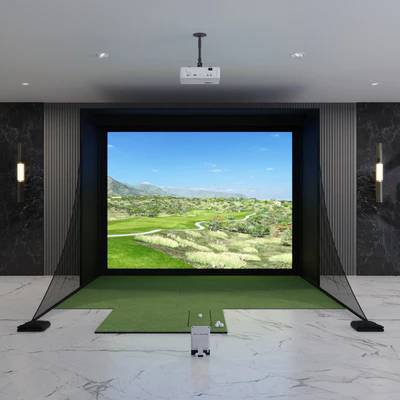
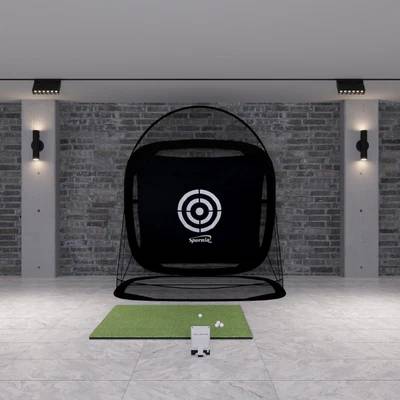
Full Swing Simulator Packages — What Each Setup Includes
The Full Swing simulator category is built around the Full Swing KIT, a portable launch monitor that can power either a full indoor simulator build or a simpler net-based practice setup. The two package directions currently visible on GolfSimPlanet are a DIY simulator package and a practice package.
Full Swing KIT DIY Golf Simulator Package
Indoor Golf Outlet specifies the DIY package with the Full Swing KIT Launch Monitor, Carl’s Place DIY Golf Simulator Enclosure Kit with Premium Impact Screen, and your choice of hitting mat and projector. This is the correct package direction if you want a real simulator room with projected course play and a configurable enclosure build. See the dedicated Full Swing KIT DIY Golf Simulator Package page for the product-level version.
Full Swing KIT Practice Package
Indoor Golf Outlet specifies the practice package with the Full Swing KIT Launch Monitor, your choice of Spornia SPG-7 or SPG-8 Golf Practice Net, and a hitting mat. This package is the better fit if your goal is data-driven practice without committing to a full enclosure and projector build. See the dedicated Full Swing KIT Practice Package page if you want to support this category with a lower-level product page.
What Both Packages Share
Both package types are powered by the same Full Swing KIT hardware: a portable radar launch monitor with machine-learning enhancement, a built-in color OLED display, built-in 4K camera with 1080p output, and support for the Full Swing app on iPhone, iPad, and Apple Watch. The common buyer decision is not “which KIT?” but “do I want a full simulator build or a practice-first setup?”
Full Swing KIT — Technical Specs That Matter for Simulator Buyers
| Technology | Radar-based launch monitor with machine-learning enhancement |
| Data points measured | 16 points of club and ball data |
| Confirmed data points listed by Full Swing | Carry distance, total distance, spin rate, spin axis, face angle, face to path, attack angle, launch angle, ball speed, club speed, smash factor, club path, horizontal angle, apex height, side carry distance, side total distance |
| Video capability | Built-in 4K camera with 1080p output |
| Display | Customizable built-in full-color OLED display |
| Indoor setup requirement | 8–10 ft of ball flight to screen or net, plus 8–10 ft of space behind the golf ball for best readings |
| Outdoor setup requirement | Place the KIT 10 ft behind the golf ball for best radar readings and video recording |
| Marked balls / stickers / calibration boards | Not required according to Indoor Golf Outlet and Full Swing product messaging |
| App ecosystem | Free Full Swing app options with data and video display on supported devices |
| Indoor gameplay software | E6 Connect is the official indoor gameplay path highlighted by Full Swing for KIT |
When a Full Swing Simulator Is the Right Fit
Choose Full Swing If You Want One Device for Indoor + Outdoor Use
Full Swing’s clearest strength is versatility. The same KIT can be used behind the ball outdoors and inside a simulator room, so it fits golfers who do not want a fixed overhead-only system. That makes it a stronger topical fit for buyers comparing portable launch monitors rather than ceiling-mounted hardware.
Choose the DIY Package If You Want a Real Projected Simulator Room
The DIY package is the right path if your goal is a full enclosure, impact screen, projector, and launch-monitor-driven simulator space. It is the better match for golfers who want a room build instead of just a net and mat. If this is your intent, also support the page with links to enclosures, simulator screens, and short throw projectors.
Choose the Practice Package If You Want Fast Setup and Data-Driven Reps
The practice package is the better fit if your main goal is to hit shots into a net, see launch-monitor feedback, and avoid the complexity of a full projector build. The Spornia net path is simpler, faster to deploy, and easier to justify when course play is not your main buying reason.
Do Not Choose Full Swing for Tight Indoor Depth
Full Swing requires meaningful space behind the ball because the KIT sits behind the player, not beside the ball or overhead. If your room is short on depth, a camera-based side unit or an overhead launch monitor may be a better fit. In that case, compare against our overhead launch monitors category.
Full Swing Simulators FAQ
What launch monitor is used in Full Swing simulator packages?
The Full Swing simulator packages on this page are built around the Full Swing KIT launch monitor. Indoor Golf Outlet specifies the KIT as the core hardware in both the DIY package and the practice package, while Full Swing positions KIT as a portable radar-based launch monitor for both indoor and outdoor use.
How much space do I need for a Full Swing simulator?
Full Swing states that indoors you need 8–10 feet of ball flight to the screen or net and 8–10 feet of space behind the golf ball for best readings and gameplay performance. Outdoors, the KIT is placed 10 feet behind the ball. That makes room depth a major buying consideration for this category.
Does Full Swing KIT require marked balls or club stickers?
No. Indoor Golf Outlet explicitly states that the Full Swing KIT setup avoids calibration boards, marked golf balls, and club stickers. That is one of the strongest ease-of-use advantages of this Full Swing simulator cluster.
What software is used for indoor Full Swing simulator play?
Full Swing’s official indoor gameplay guidance for KIT points to E6 Connect as the simulator software path for indoor play. If software choice is part of the buying decision, support this page with internal links to software and related Full Swing launch monitor pages.
Key Features of Our Full Swing
Full Swing Simulators — Key Specs & Selection Criteria
Four attributes make Full Swing the right simulator choice for a specific buyer: portable indoor/outdoor use, 16 club-and-ball data points, built-in video feedback, and a low-friction setup with no marked balls, club stickers, or calibration boards.
Indoor + Outdoor Flexibility
Full Swing KIT is not locked to one environment. Full Swing’s own setup guidance supports both indoor and outdoor use, which makes this simulator cluster especially relevant for golfers who want one launch monitor they can use at home and on the range.
16 Points of Club & Ball Data
Indoor Golf Outlet and Full Swing both position KIT around 16 measured data points, including core ball speed, launch, spin, club speed, club path, attack angle, smash factor, and distance outputs. That makes it a true data device, not just a basic distance monitor.
Built-In 4K Video Feedback
The KIT includes a built-in 4K camera with 1080p output, which gives Full Swing a stronger training angle than pages that talk only about ball flight. For simulator and practice buyers, video plus radar data is one of the clearest decision-making features in this cluster.
Low-Friction Setup
Indoor Golf Outlet’s Full Swing messaging emphasizes ease of use: no calibration boards, no marked golf balls, and no club stickers. That is a real buying differentiator because many golfers want fast setup and repeat use, not extra prep before every session.
📋 Full Swing is strongest when you want portability and flexibility, not when you want the shortest possible indoor room depth. Compare it against portable launch monitors and then against all golf simulators.
Why Choose Us When You Shop Full Swing?
Why Buy a Full Swing Simulator from GolfSimPlanet?
A Full Swing simulator is not just a launch monitor purchase. It is a buying decision that depends on whether you want a full enclosure build or a simpler practice-first setup, how much room depth you have, whether you need indoor and outdoor use from the same device, and whether your software plan is centered on indoor E6 Connect play. GolfSimPlanet gives this page stronger commercial context because it can be supported with closely related internal pages for Full Swing launch monitor, Full Swing KIT launch monitor, Full Swing KIT DIY package, Full Swing KIT Practice Package, software, and golf simulator computers. That makes this page more useful as a real buying hub inside the cluster instead of a thin brand category.