- Home
- NVISAGE Golf Simulators
NVISAGE Golf Simulators
A NVISAGE golf simulator — also called an NVISAGE N1 simulator, NVISAGE overhead golf simulator, or NVISAGE N1 golf simulator package — is a home golf simulator build centered on the NVISAGE N1 overhead launch monitor: a ceiling-mounted photometric system that uses two 2,000 FPS high-speed cameras and a 24" × 20" hitting zone to capture core shot data for simulator play and indoor practice. The NVISAGE N1 mounts 9–10 feet overhead and about 2 feet in front of the tee, which keeps the floor clear and makes it a natural fit for fixed simulator rooms rather than portable practice setups. On GolfSimPlanet, the logical NVISAGE path under this cluster includes the main NVISAGE golf simulator page, the dedicated NVISAGE launch monitor page, and the specific NVISAGE N1 DIY Golf Simulator Package. Indoor Golf Outlet confirms the NVISAGE N1 simulator ecosystem is built around complete overhead packages that pair the launch monitor with a golf simulator enclosure, impact screen, choice of projector, and hitting mat. The NVISAGE N1 works with GSPro and E6 Connect, supports both left- and right-handed play through its overhead design, and is intended for indoor simulator use rather than range portability. If you want a budget-friendlier overhead launch monitor with third-party simulator software compatibility, NVISAGE is one of the clearest entry points in this segment.
NVISAGE Golf Simulators — What the System Is Built Around
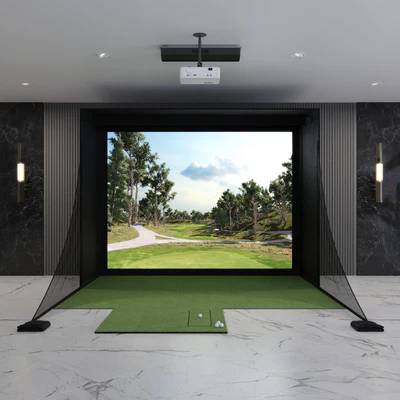
NVISAGE golf simulator packages are built around the NVISAGE N1, an overhead-mounted launch monitor designed for dedicated indoor simulator rooms. Unlike portable radar units that sit on the floor behind the golfer, the N1 mounts above the hitting area and keeps the floor around the ball completely clear.
NVISAGE N1 Overhead Launch Monitor
The NVISAGE N1 is mounted overhead at approximately 9–10 feet high and about 2 feet in front of the tee. It uses two 2,000 FPS cameras and a 24" × 20" hitting zone to capture shot data for simulator play. This placement makes it more comparable to other overhead launch monitors than to portable floor units.
DIY Package Path
Indoor Golf Outlet’s NVISAGE N1 DIY package pairs the N1 with a Carl’s Place DIY Golf Simulator Enclosure Kit with Premium Impact Screen, a Carl’s Place Hotshot mat, and a choice of BenQ projector. That makes it the correct NVISAGE path for golfers building a fully customized simulator room around their available space and image requirements.
SIG Package Path
Indoor Golf Outlet also offers an NVISAGE N1 SIG package built around SIG8, SIG10, or SIG12 enclosure options, a SIGPRO screen, landing pad turf, and a SIGPRO mat choice. This version fits buyers who want a more predefined enclosure system rather than a more open-ended DIY build.
NVISAGE N1 — Technical Specifications
| Mounting type | Overhead launch monitor |
| Mounting position | 9–10 ft overhead, about 2 ft in front of the tee |
| Shot capture technology | Photometric camera-based system |
| Cameras | 2 high-speed cameras at 2,000 FPS |
| Hitting zone | 24" × 20" |
| Dimensions | 21.8" L × 6.9" W × 4.9" H |
| Weight | 19.2 lbs |
| Software compatibility | GSPro and E6 Connect |
| Use environment | Indoor simulator use |
| Key measured metrics widely listed for N1 | Club speed, ball speed, launch angle, spin axis, horizontal launch angle, back spin, side spin, total spin |
| Ball requirement note | Several retailer and review sources state specially crafted / marked balls are used or recommended for best accuracy |
When an NVISAGE Golf Simulator Is the Right Fit
Choose NVISAGE If You Want Overhead Simplicity
NVISAGE makes the most sense for golfers who want an overhead launch monitor without stepping into premium-price territory. The N1 keeps the floor clear, avoids a behind-the-ball radar position, and gives a cleaner permanent simulator layout than most portable systems.
Choose NVISAGE If GSPro Matters
One of the clearest reasons to choose NVISAGE is software flexibility. The N1 is explicitly listed as compatible with GSPro and E6 Connect, so it fits buyers who care about third-party simulator ecosystems rather than being locked into a single closed platform. See our GSPro software and simulator software pages if software choice is one of your buying drivers.
Choose Another Path If You Need Portability
An NVISAGE simulator is not the best match for golfers who want to move the launch monitor between the garage, range, and backyard. In that case, a portable launch monitor or another portable simulator build is usually the better intent match.
Choose DIY vs SIG Based on Room Build Style
The DIY package is the better fit if you want more freedom around enclosure size and projector choice. The SIG package is the better fit if you prefer a more standardized enclosure system. In both cases, NVISAGE is best understood as an indoor overhead simulator brand rather than a general-purpose practice monitor.
NVISAGE Golf Simulator FAQ
What launch monitor is used in NVISAGE golf simulator packages?
The NVISAGE simulator packages most clearly documented in current retailer sources are built around the NVISAGE N1, an overhead-mounted photometric launch monitor. It uses two 2,000 FPS cameras, mounts above the hitting area, and is designed for indoor simulator rooms rather than portable outdoor use.
What software does the NVISAGE N1 support?
Current retailer specs list the NVISAGE N1 as compatible with GSPro and E6 Connect. That makes it attractive for golfers who want third-party simulator software rather than being locked to one proprietary simulator platform.
What space and mounting setup does an NVISAGE simulator need?
The NVISAGE N1 is specified to mount about 9–10 feet overhead and roughly 2 feet in front of the tee. Because it is an overhead unit, the key room-planning factors are ceiling height, safe swing clearance, enclosure size, and projector fit — not the behind-the-ball floor space that radar units need.
Does NVISAGE require special golf balls?
The sources are not fully consistent in wording, but multiple current retailer and review pages indicate that the N1 uses specially crafted or marked balls for best accuracy. Because of that, it would be inaccurate to present NVISAGE as a fully marker-free overhead system.
Key Features of Our NVISAGE
NVISAGE Golf Simulators — Key Specs & Selection Criteria
Four attributes make NVISAGE the right simulator choice for a specific buyer: true overhead installation, a generous 24" × 20" hitting zone, GSPro/E6 Connect compatibility, and configurable package paths built around either DIY or SIG enclosure systems.
Overhead Design — Clean Hitting Area
The NVISAGE N1 mounts above the hitting area instead of sitting beside or behind the golf ball. That gives golfers a cleaner simulator room layout and removes the floor-space tradeoff that portable radar units create.
24" × 20" Hitting Zone
Indoor Golf Outlet lists the NVISAGE N1 with a 24-inch by 20-inch hitting zone. That gives more teeing freedom than tighter hitting windows and supports easier left/right-handed use within a dedicated simulator environment.
GSPro + E6 Connect Compatibility
NVISAGE’s strongest software signal is third-party compatibility. Current specs list support for GSPro and E6 Connect, which matters because simulator buyers often choose software ecosystem before they choose enclosure details.
DIY or SIG Package Direction
NVISAGE packages are not limited to one enclosure path. The N1 is sold in a DIY package with Carl’s Place components and in a SIG package with SIG enclosure choices, which gives buyers two clearly different setup routes depending on room goals and assembly preference.
📋 NVISAGE is a better fit for fixed indoor simulator builds than for portable practice. If you are comparing categories, check overhead launch monitors first, then compare back to all golf simulators.
Reasons to Choose Us When You Shop NVISAGE
Why Buy an NVISAGE Golf Simulator from GolfSimPlanet?
An NVISAGE simulator is not just a launch monitor purchase — it is an overhead simulator decision that depends on enclosure size, projector fit, room height, hitting mat choice, computer performance, and software preference. GolfSimPlanet gives this page stronger buying context because the NVISAGE cluster can be internally reinforced through the related pages for NVISAGE launch monitor, NVISAGE N1 DIY package, overhead launch monitors, software, projectors, and golf simulator computers. That makes the NVISAGE page more useful as a real commercial decision page instead of a thin brand mention. If your buying intent is “entry-level overhead simulator with third-party software support,” NVISAGE is one of the clearest topical fits in this cluster.