
- Home
- SkyTrak Simulators
SkyTrak Simulators
A SkyTrak golf simulator — also called a SkyTrak+ simulator package, SkyTrak DIY golf simulator, or SkyTrak indoor golf system — is a complete golf simulator build centered on the SkyTrak+ launch monitor: a photometric camera + dual Doppler radar fusion device that measures 20+ ball flight and club data parameters including ball speed, launch angle, backspin, sidespin, spin axis, carry distance, smash factor, club head speed, face angle, and club path — delivering accuracy within 2 yards of tour-level systems costing up to $20,000, per independent Golfbays testing. The SkyTrak+ uses two ultra-high-speed cameras and two Xenon flash bulbs for photometric ball capture at impact, combined with dual Doppler radar for club data — requiring no marked balls and no alignment stickers on clubs. It connects via 2.4GHz/5GHz WiFi to iPad, iPhone, Android, PC, and Mac, with a rechargeable lithium-ion battery providing 5 hours of continuous use. GolfSimPlanet carries three SkyTrak+ simulator configurations: the SkyTrak+ Spornia Practice Package (launch monitor + Spornia SPG hitting net + ProStrike mat — practice-only configuration, no projector or enclosure required), the SkyTrak+ DIY Golf Simulator Package (launch monitor + enclosure + impact screen + projector + hitting mat — complete virtual course play), and the SkyTrak+ Golf Simulator Practice Package (5×5 high-impact mat + 8.5×8.5 ft return net + SkyTrak+ unit — compact, portable, indoor/outdoor capable). All SkyTrak+ packages are compatible with E6 Connect, WGT Golf, TGC 2019, and The Golf Club 2019 simulator software. Contact our Scottsdale, AZ team to confirm which SkyTrak+ package matches your room dimensions and practice goals.
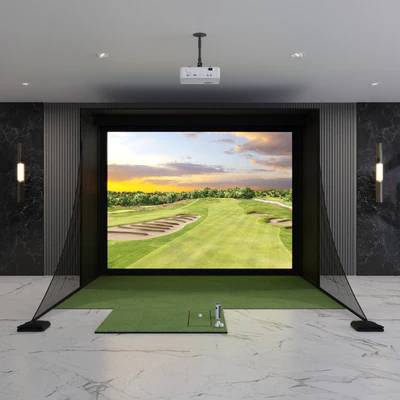
SkyTrak+ DIY Golf Simulator Package
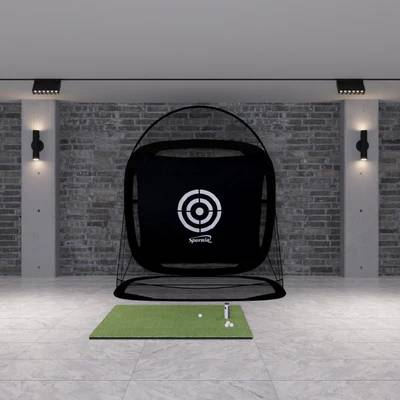
SkyTrak+ Spornia Practice Package
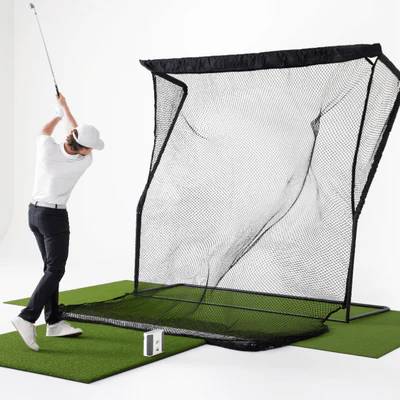
SkyTrak+ Golf Simulator Practice Package
SkyTrak+ Simulator Packages — What’s Included in Each
Three SkyTrak+ simulator configurations are available at GolfSimPlanet — from a compact practice net setup to a full virtual course DIY build. All three include the SkyTrak+ launch monitor as the core measurement device.
SkyTrak+ Spornia Practice Package
Includes: SkyTrak+ launch monitor + Spornia SPG-7 or SPG-8 hitting net + ProStrike hitting mat. Configuration: Practice-only — no projector, no enclosure, no virtual course play. The Spornia net acts as the ball stop; SkyTrak+ measures each shot and delivers data via the SkyTrak app on your mobile device or tablet. Spornia SPG-7: 7×7 ft automatic ball return net — ball rolls back to your feet after each shot. Spornia SPG-8: 8.5×8.5 ft version for longer irons and drivers. Use case: Garage or basement data-driven practice without a full simulator room build. Shot Optimizer, Bag Mapping, Wedge Matrix, and Skills Assessment available via SkyTrak+ app. Space: Minimum room size to swing freely — no throw distance calculation required without projector.
SkyTrak+ DIY Golf Simulator Package
Includes: SkyTrak+ launch monitor + enclosure (Rain or Shine or Carl’s Place) + SIGPRO impact screen + BenQ short throw projector + hitting mat. Configuration: Complete virtual course simulator — play E6 Connect, WGT, or TGC 2019 courses projected onto the impact screen with full shot data overlay. Space requirement: 9 ft ceiling height minimum, 12 ft width, 14–17 ft depth recommended (SkyTrak+ camera-based unit works from 8–10 ft from screen — tighter depth than radar alternatives). Use case: Full home golf simulator build for year-round virtual course play and practice. SkyTrak+ positions beside or slightly behind the ball on the hitting mat — no overhead mount or ceiling installation required.
SkyTrak+ Golf Simulator Practice Package
Includes: SkyTrak+ launch monitor + 5×5 high-impact hitting mat + 8.5×8.5 ft return net + ball tray. Configuration: Compact portable practice package — indoor or outdoor capable. The 5×5 hitting mat provides a realistic turf feel; the return net stops balls without a full enclosure frame. SkyTrak+’s photometric camera system works on outdoor mats without environmental calibration issues that affect radar-only units. Use case: Apartment, condo, or small room practice setup; backyard range practice; golfers who want portable data-driven practice without a permanent room installation. Battery-powered SkyTrak+ unit requires no power cable at the hitting position — fully wireless during a session.
SkyTrak+ Launch Monitor — Technical Specifications
| Technology | Photometric camera system + dual Doppler radar fusion |
| Cameras | 2 ultra-high-speed cameras + 2 invisible Xenon flash bulbs + 2 Class 3R lasers |
| Ball parameters | Ball speed, launch angle, backspin, sidespin, spin axis, carry distance, total distance, offline distance |
| Club parameters | Club head speed, smash factor, face angle, club path (via Doppler radar + machine learning) |
| Total parameters | 20+ ball flight and club data metrics |
| Accuracy | Within 2 yards of tour-level systems up to $20,000 (Golfbays independent testing); avg. 3.47% carry distance differential (carlofet.com real-world testing) |
| Marked balls required | No — standard golf balls, no stickers or dot markers |
| Room depth required | 8–10 ft from unit to screen (camera-based — no minimum distance requirement unlike radar units) |
| Hitting area | ~40% larger than original SkyTrak; unit positions 1.5″ farther from ball |
| Connectivity | 2.4GHz + 5GHz WiFi; connects to iPad, iPhone, Android, PC, Mac |
| Battery | Rechargeable lithium-ion, 5 hours continuous use; USB-C charging |
| Dimensions / Weight | 17.5cm H × 16.5cm L × 6cm W; 0.8 kg |
| Compatible software | E6 Connect, WGT Golf, TGC 2019, The Golf Club 2019, SkyTrak app (Shot Optimizer, Bag Mapping, Wedge Matrix, Skills Assessment, Practice Randomizer) |
| Shot-to-show time | Just over 2 seconds |
| Outdoor use | Yes — photometric system works on outdoor mats without environmental calibration issues |
SkyTrak+ vs. Competing Launch Monitors — When to Choose SkyTrak
SkyTrak+ vs. FlightScope Mevo+
The SkyTrak+ is the correct choice for rooms under 12 ft total depth — its photometric camera works from 8–10 ft from screen, while the Mevo+ radar requires 10–16 ft. The Mevo+ delivers 17 parameters vs. SkyTrak+’s 20+ and adds full outdoor range functionality without dot-marked balls. If your room is 14+ ft deep and you want outdoor range use, FlightScope Mevo+ is the stronger all-round value. If your room is under 12 ft deep, SkyTrak+ is the better technical fit.
SkyTrak+ vs. Foresight GC3
The Foresight GC3 uses 3 cameras for ±1% ball speed accuracy vs. SkyTrak+’s ~3.5% average carry distance differential. The GC3 measures 14 parameters with higher spin axis accuracy — the correct choice for club fitting, teaching professionals, and golfers who need the most accurate spin data available in the portable camera category. The SkyTrak+ is the stronger value for home simulator play and casual game improvement at a significantly lower price. For Foresight simulator packages, see our dedicated page.
SkyTrak+ vs. Garmin R10
The Garmin R10 is a radar-only unit at $599 — it measures 12 parameters with radar-calculated spin. The SkyTrak+ measures 20+ parameters with directly-imaged spin data (more accurate spin axis and sidespin), operates from 8 ft room depth vs. Garmin R10’s 10 ft minimum, and works without dot-marked balls or the E6 subscription the R10 needs for virtual courses. For golfers who want meaningful swing data beyond basic ball speed and distance, SkyTrak+ is the technically superior choice. For Garmin simulator packages, see our dedicated page.
SkyTrak+ Compatible Software Platforms
SkyTrak+ supports four simulator software platforms: E6 Connect (subscription-based, 100+ courses, iOS/Android/PC/Mac, most popular SkyTrak+ platform), WGT Golf (free with limited courses, mobile-first), TGC 2019 / The Golf Club 2019 (Windows/Mac, 170,000+ user-created courses, one-time license). SkyTrak+ does not support GSPro — if GSPro is your preferred platform, the FlightScope Mevo+ is the correct launch monitor choice.
SkyTrak Golf Simulator FAQ
Is SkyTrak+ a radar or camera launch monitor?
SkyTrak+ uses a fusion of photometric camera technology and dual Doppler radar. The camera system — two ultra-high-speed cameras with Xenon flash illumination — directly captures ball position and spin at impact. The dual Doppler radar adds club data measurement (club head speed, face angle, club path) via advanced machine learning. This fusion approach gives SkyTrak+ directly-measured spin data (not calculated from flight) while also delivering full club data — a capability the original SkyTrak lacked. Because it is primarily camera-based, it works from 8 ft of room depth and does not require marked balls.
What simulator software does SkyTrak+ support?
SkyTrak+ is compatible with E6 Connect (subscription, 100+ courses, most popular), WGT Golf (free tier available), TGC 2019, and The Golf Club 2019. E6 Connect is the recommended platform for most SkyTrak+ builds — it supports multiplayer, tournament modes, practice ranges, and skill games across iOS, Android, PC, and Mac. SkyTrak+ does not natively support GSPro. If your priority is GSPro access, see our FlightScope simulator packages.
What is the minimum room size for a SkyTrak+ golf simulator?
The SkyTrak+ camera system works from 8 ft between the unit and the impact screen — making it compatible with tighter rooms than radar-based portable launch monitors. Minimum recommended room dimensions for a full DIY simulator build are: 9 ft ceiling height, 12 ft width, and 13–15 ft total depth (8 ft unit-to-screen + 4–5 ft hitting area behind unit). A standard two-car garage (20 ft deep × 20 ft wide × 9 ft ceiling) accommodates a SkyTrak+ DIY simulator with comfortable clearance. For the Spornia practice package only, the space requirement is simply enough room to swing freely — no throw distance calculation needed.
Key Features of Our SkyTrak
SkyTrak+ Golf Simulators — Key Specs & Selection Criteria
Four attributes make the SkyTrak+ the right launch monitor for a specific simulator build: camera + radar fusion technology for directly-measured spin without marked balls, 8 ft minimum room depth compatibility for tight rooms, 20+ parameter data set for meaningful game improvement, and E6 Connect / TGC 2019 software compatibility for virtual course play.
Camera + Radar Fusion — Direct Spin Measurement
SkyTrak+ uses two ultra-high-speed cameras with Xenon flash illumination to directly image the ball at impact — measuring backspin, sidespin, and spin axis from the ball’s actual surface movement rather than calculating spin from flight trajectory. This is the same direct-measurement approach used by professional tour fitting systems. The dual Doppler radar component adds club head speed, face angle, and club path via machine learning — data points that radar-only units at lower price points calculate with less precision. The fusion of direct camera spin measurement and radar club data delivers 20+ parameters from a single compact unit that fits in the palm of your hand.
8 ft Room Depth — Compact Room Compatible
The SkyTrak+ photometric camera system captures ball data at impact — it does not need the ball to travel a flight distance to generate accurate readings. This means the unit can be positioned as close as 8 ft from the impact screen, making it compatible with rooms that radar-based portable launch monitors (FlightScope Mevo+ requires 10–16 ft, Garmin R10 requires 10+ ft) cannot accurately use. For basement and garage simulator rooms with 13–15 ft total depth from back wall to screen, SkyTrak+ is frequently the only portable launch monitor that fits the room correctly without accuracy compromise.
Shot Optimizer & Practice Tools
The SkyTrak+ native app includes a suite of practice tools beyond basic shot data: Shot Optimizer — hit 20 shots with any club to establish expected distance benchmarks, then score each subsequent shot against those baselines with color-coded red/yellow/green feedback. Bag Mapping — establish carry distances for all 14 clubs to calibrate your distance knowledge. Wedge Matrix — practice pitches, half-shots, 3/4 swings, and full swings with up to four wedges simultaneously. Skills Assessment — set 10 target stations for structured practice sessions. Practice Randomizer — variable distance practice drill. These tools make the Spornia Practice Package a structured training platform, not just a ball tracking device.
Wireless & Battery-Powered — No Cable at the Hitting Position
SkyTrak+ is completely wireless during a session — rechargeable lithium-ion battery delivers 5 hours of continuous use, eliminating the power cable at the mat that affects wired overhead units and creates a trip hazard in some simulator room layouts. USB-C rapid charging via the included cable. WiFi connectivity at both 2.4GHz and 5GHz provides stable connection to iPad, iPhone, Android tablets and phones, Windows PC, and Mac without a dedicated Ethernet cable run. The 5GHz band addition in SkyTrak+ (vs. 2.4GHz only in the original SkyTrak) significantly reduces connection dropouts in homes with congested 2.4GHz WiFi environments.
📋 Not sure whether the SkyTrak+ Practice, DIY, or Spornia package fits your room and goals? GolfSimPlanet’s Scottsdale, AZ team confirms the right package configuration for your space. Contact us here.
Why Choose Us When You Shop SkyTrak?
Why Buy SkyTrak Golf Simulators from GolfSimPlanet?
SkyTrak+ is one of the most popular entry-to-mid-range simulator launch monitors in the US home market — and the most room-depth-flexible camera-based portable unit available, working from 8 ft in rooms where competing radar units produce inaccurate data. GolfSimPlanet carries every SkyTrak+ simulator configuration — Spornia Practice Package, DIY Golf Simulator Package, and Practice Package — with enclosure, screen, and projector selections confirmed for your specific room dimensions. Our Scottsdale, AZ team reviews your room depth, ceiling height, software preference, and practice goals before recommending the right SkyTrak+ package and component combination. If SkyTrak+ is not the right fit for your room or goals — for example if you need GSPro compatibility, deeper room radar performance, or overhead accuracy — our team will recommend the correct alternative from our full catalog of golf simulator packages rather than push a product that does not fit your build.